
Author: Eddy Ballesteros

  • 30 Genius Ways to Make Money with AI in 2025

    30 Genius Ways to Make Money with AI in 2025

    If you’re like me, you’ve probably watched hundreds of videos claiming you can become rich overnight with AI.

    It’s impossible unless you’re scamming people or ruining the reputation you’ve worked so hard to earn.

    So I’m hoping to teach you how to make money with AI without the hype or buzzwords, such as selling AI automation to businesses that don’t need it.

    You’ll also learn about the AI-powered tools you should leverage when choosing one of these ideas.

    How To Make Money With AI

    If you’re visiting my website for the first time, my name is Eddy.

    I’ve made a living by teaching founders and brands how to integrate AI solutions into their marketing without the guesswork.


    Different Ways You Can Make Money With AI

    These are some of the best ways to start making money with AI in 2025.

    1. AI Content Writing Services

    Business owners and marketers are overwhelmed by the content demands on blogs, social media, emails, and more, but they lack the time or specialized knowledge to create it all themselves.

    By offering AI content writing services, you can be their solution for consistent, high-quality content without the traditional costs of a full-time writer.

    Some AI blogging tools, like Cuppa, even offer DFY packages.

    Cuppa AI DFY plans

    AI writing tools can improve grammar and suggest tone and style adjustments. 

    They also speed up the writing process and maintain accuracy, making them invaluable for meeting tight deadlines.

    The key is specialization. Rather than competing with thousands of generic AI writers, focus on a specific industry where you have knowledge or interest.

    Legal content, SaaS companies, real estate, and healthcare are all perfect niches for content writers who understand their industry and audience.

    2. Build Apps With AI Coding Tools

    New AI coding tools using natural language processing allow you to build functional applications in days rather than months, even without extensive coding knowledge.

    Leveraging machine learning-powered IDEs like Lovable, Windsurf, and Google Firebase can help you tackle complex tasks while focusing on business problems.

    Create custom applications for specific industries ($5,000-20,000) or develop niche software solutions sold as subscriptions ($20-100/month per user).

    This opportunity is insane for creators and non-coders who identify market gaps but lack the technical skills to create solutions.

    3. Sell AI Prompts

    Many people struggle to create effective AI prompts. This is one the simplest ways you can make money with AI.

    By developing and selling specialized prompts, you can help others save time and achieve better results.

    Create industry-specific prompt packs ($27-97 per collection) or premium libraries with regular updates ($10-50/month subscription).

    For example, build an “AI Marketing Prompts Bundle” with 50 tested prompts for social media, emails, and ad copy.

    I’ve done this for myself by creating an online community teaching others how to create content with the help of AI prompts.

    This business scales infinitely, which allows you to create once and sell thousands of times without additional effort.

    4. Build AI Agents

    Businesses need automation but lack the technical expertise to implement it.

    You’ll build specialized AI agents that handle repetitive tasks automatically using platforms like Lindy AI, Zapier, or Gumloop.

    These systems can manage lead generation, customer follow-ups, data entry, and content distribution without human oversight.

    Offer custom agent development ($1,000-5,000) or subscription access to your agents ($50-500/month per client).

    For example, build a lead generation agent for real estate agents that finds potential sellers and sends personalized outreach.

    One agent could serve multiple clients in different areas, creating scalable revenue without additional work.

    5. Set up AI Chatbots

    Businesses risk losing potential customers when they fail to respond quickly to inquiries.

    AI-powered chatbots enable companies to provide instant support around the clock without hiring additional staff. This solution particularly benefits small businesses lacking the resources for a full-time customer service team.

    Using natural language processing, you can create organic conversation flows while automating repetitive tasks.

    Offer comprehensive chatbot packages ranging from $1,000 to $3,000 and monthly maintenance services priced between $500 and $1,500.

    Also, develop industry-specific templates that can be easily customized to streamline your service and ensure consistent value delivery.

    6. Teach Others How To Use AI

    Professionals across industries must embrace AI for business growth, but often don’t know where to start.

    Create courses and training programs that teach practical AI skills to help people future-proof their careers while building a scalable education business.

    You can learn how to create courses with AI by watching my video tutorial. 

    Focus on specific applications rather than general AI concepts, showing how to implement these tools for tangible results.

    Create online courses ($200-2,000 per student) or offer live workshops ($500-5,000 per event). 

    For example, develop a course called “AI for Freelance Writers” that teaches writers to use AI tools for research, outlining, and enhancing their work.

    7. Run UGC Ads With AI

    Brands struggle to create authentic user-generated content for ads. Use AI tools to help them produce engaging social media posts and ad creative at scale.

    Combining AI-generated ideas with your marketing strategies allows you to craft content that resonates with target audiences and drives conversions.

    Create UGC packages ($1,000-3,000/month) or develop AI-enhanced ad campaigns ($2,000-8,000).

    For example, create a “UGC Content Bundle” with 30 unique ad concepts, including visuals and copy variations for testing.

    By leveraging AI UGC generators for the creative heavy lifting, you’ll deliver in days what normally takes weeks with multiple creators.

    8. Sell AI-Generated Art

    Visual content creators struggle with time-consuming design processes.

    By leveraging AI image generators like Midjourney and DALL-E, you can create stunning artwork that sells on marketplaces or as custom commissions.

    Write effective AI art prompts that produce unique, marketable styles, from portraits to abstract designs.

    Offer packages ($50-300) or build passive income streams selling digital assets, Canva art, or print-on-demand products. 

    For example, create an AI art collection for interior designers that matches specific color schemes, generating $2,000+ monthly with minimal ongoing effort.

    9. Offer AI Translation Services

    Global businesses need to communicate in multiple languages, but professional translation is often slow and expensive.

    By combining AI translation tools with your language expertise, you can offer fast, accurate, and affordable translation services for websites, marketing materials, and product descriptions.

    Use artificial intelligence for the heavy lifting while adding value through cultural context and quality assurance.

    Create website localization packages ($1,000-5,000 per language) or provide e-commerce translation services ($50-200 per product).

    This opportunity is solid for multilingual individuals who can ensure that AI translations accurately capture language and cultural nuances.

    10. Build Websites With AI

    Small business owners often struggle with website creation, typically overpaying for mediocre results.

    You can deliver custom, high-converting websites faster and more affordably using AI-powered website builders than traditional methods.

    Learn tools like Lovable or Hostinger AI that generate websites from simple prompts, then customize them for specific business needs.

    Offer quick-launch packages ($1,000-3,000) or create industry-specific templates ($500-1,500). For recurring revenue, include ongoing maintenance with AI content updates ($300-1,000/month).

    This business leverages AI to handle technical aspects while you focus on strategy and client relationships, creating a scalable service that delivers exceptional results.

    11. Manychat Automation and Marketing

    Small businesses struggle with consistent follow-up and lead nurturing.

    By creating AI-powered chatbot systems, you can help them capture and convert more leads through automated yet personalized messaging. 

    Using platforms like Manychat integrated with digital marketing strategies, you can design conversation flows that qualify leads, answer questions, and nurture prospects automatically.

    Create custom chatbot systems ($1,000-3,000 setup) with monthly management ($500-1,500/month).

    For example, build a “Lead Generation Chatbot” for real estate agents that automatically qualifies buyers and schedules viewings, delivering consistent results with minimal ongoing effort.

    12. Find Trends

    Businesses struggle to predict what customers will want next.

    With AI-powered trend forecasting, you can help companies identify emerging market trends and opportunities before competitors, giving them a significant advantage.

    Combine data analysis with industry expertise to translate patterns into actionable business recommendations.

    Create industry-specific trend reports ($1,000-5,000) or offer monthly monitoring services ($1,500-5,000/month).

    Using predictive analytics to spot emerging opportunities, analyze social media data, search patterns, and consumer behavior.

    This positions you as a strategic partner, commanding premium rates rather than just a service provider.

    13. Humanize AI Content

    As more companies use AI writing tools for content creation, the internet fills with generic, robotic articles.

    Your service can change AI-generated content into engaging, authentic material with personality and voice.

    You’re not just editing; you’re adding insights, stories, and a distinct voice that makes the content uniquely valuable.

    Offer “AI Enhancement” packages for blog posts ($50-200 per article) or monthly humanization retainers ($1,000-3,000/month).

    You’ll provide a long-term business model by focusing on the human elements that AI struggles with, like storytelling, emotional connection, and cultural references.

    14. Improve Already Existing Content

    Using artificial intelligence and machine learning to improve existing content is a great way to make money as a freelance writer.

    If you have clients who are satisfied with your work, offer to enhance their blog posts using AI text generation.

    Grammarly is effective for reviewing content once it’s created or published.

    Grammarly Mistakes

    You can use an AI writing assistant to help with grammar, sentence structure, and existing articles. This can help your clients rank higher in Google, benefiting everyone involved.

    I use Surfer SEO, an AI SEO auditing tool for blog posts, and then improve my content using Poppy AI.

    15. AI Copywriting Services

    Marketing teams struggle to create persuasive copy that converts visitors into buyers.

    With AI copywriting services, you’ll provide high-converting sales pages, email sequences, and ad copy that generate revenue.

    Leverage AI tools for copywriting while applying your understanding of marketing strategies and psychological triggers. You’ll need copywriting knowledge, familiarity with AI writing services, and a sense of brand voices to succeed.

    Offer specialized packages like sales pages ($500-2,000) or email sequences ($300-1,500).

    By building proven frameworks that consistently deliver results, you’ll become an invaluable partner to businesses looking to boost their conversion rates.

    16. AI SEO Consulting

    Businesses invest thousands in websites but struggle with search visibility.

    Use AI tools to analyze keywords, identify content gaps, and craft data-driven SEO strategies in days instead of weeks.

    You’re not offering generic advice – you’re providing actionable insights directly impacting bottom lines. Offer comprehensive SEO audits ($500-2,500) or monthly management packages ($1,500-7,000/month).

    Use AI marketing tools to analyze competitors, identify opportunities, and develop content strategies that align with search intent.

    For example, create a roadmap showing exactly what content a business needs to outrank competitors, delivering high-value insights that traditional SEO services can’t match.

    17. AI Social Media Analytics

    Marketing teams struggle to understand what’s effective on social media.

    With AI-powered data analysis tools, you can help brands optimize their social strategies by providing actionable insights.

    AI can also enhance social media management by automating content scheduling and analyzing engagement metrics, allowing teams to focus on creative strategies.

    Using predictive analytics and machine learning, you’ll identify patterns in audience engagement and develop growth-driven content strategies.

    Create social media audit packages ($500-2,000) or monthly analytics services ($1,000-3,000/month).

    Develop custom dashboards to track performance metrics across platforms and provide actionable recommendations.

    By focusing on key metrics, you’ll help businesses understand their customer data and target audience.

    Once you master this, you can make money and manage social media brands using AI.

    18. Write YouTube Scripts With AI

    Content creators face pressure to publish more videos while maintaining quality.

    Offer AI-powered YouTube scriptwriting services to help them produce engaging content. With your knowledge of YouTube’s algorithm and viewer psychology, craft scripts that hook and keep viewers watching.

    Use AI tools for YouTube content to create frameworks for different video types, then customize them for clients.

    Charge $100-300 per script or create monthly packages for regular creators.

    The demand for quality YouTube content is growing, making this a sustainable opportunity for freelance writers who understand AI and video content strategy.

    19. AI Affiliate Marketing

    Traditional affiliate marketing requires constant content creation and optimization.

    As an AI-powered affiliate marketer, leverage artificial intelligence to identify profitable niches, create converting content at scale, and optimize your affiliate marketing website for maximum earnings.

    Focus on markets where you understand customer behavior and use AI text generators to create targeted content addressing specific needs.

    Build niche affiliate sites ($1,000-5,000/month per site) or offer creation services for others ($2,000-5,000).

    Automate repetitive aspects of content creation to focus on strategy and scaling.

    20. Start Your Own Blogging Business

    Starting a blog and ranking at the top of search engines is achievable with AI content-writing software.

    I use an AI writer to produce articles and create content for Google that generates income in less time.

    This approach allows you to quickly and easily create high-quality content for your blog.

    You can also use AI tools for SEO, keyword research, and backlinking.

    Note: Do not rely solely on the AI writing tool’s output. Before publishing your blog post, personalize, fact-check, and review for grammar mistakes.

    You can create a monetization stack with the blogging methods below:

    • Ad displays such as Google AdSense or Ezoic
    • Affiliate marketing
    • Online courses
    • Coaching or consulting
    • Sponsored placements

    If you’re serious about making money blogging, use AI to help you write blog posts ready for publication in a fraction of the time.

    21. AI Graphic Design

    Small businesses need professional graphics but can’t afford traditional designers.

    Using AI-generated artwork tools like Midjourney and DALL-E, you can create custom designs without years of training.

    Offer packages for social media graphics, presentations, or brand assets ranging from $200 to $1,000, or monthly subscriptions for ongoing design needs ($500 to $2,000/month).

    Focus on selling AI-generated artwork tailored to specific industries or brand guidelines.

    For example, create a “Social Media Pack” with 30 custom-designed posts for $500, completed in one day once you’ve established your workflow.

    This delivers value while enabling you to serve multiple clients simultaneously.

    22. Write Newsletters

    Businesses know they should send regular newsletters to nurture their audience, but creating consistent, engaging content is time-consuming.

    Many companies start newsletters but abandon them due to ongoing content demands. This presents an opportunity for you to offer AI-powered newsletter creation services.

    By using AI tools, you can help brands maintain consistent communication with their audience through personalized, valuable content that nurtures relationships and drives sales. 

    AI-driven email marketing can tailor content to increase engagement and conversion rates, ensuring each message resonates with its intended audience.

    23. Automate Customer Service Tasks

    Customer service bottlenecks frustrate customers and lead to lost sales.

    Implementing AI agents and virtual assistants helps automate repetitive tasks and improve satisfaction.

    Using natural language processing, you can create systems that handle common questions and escalate complex issues to humans.

    Build custom support automation ($2,000-5,000 setup) with monthly maintenance ($500-2,000/month).

    For instance, create a customer service suite for e-commerce that manages order status, returns, and product inquiries.

    This reduces support costs while improving the customer experience through faster responses.

    24. AI Video Editing

    Video production typically requires technical skills and hours of tedious work.

    With AI video editing tools, you can quickly help content creators produce professional videos.

    Offer editing packages ($200-1,000 per video) or monthly content plans for regular creators ($1,000-3,000/month). 

    For example, create a “Content Multiplier” service that transforms one long video into 15-20 platform-specific clips optimized for social media channels.

    Using AI tools for repetitive editing tasks allows you to manage multiple client projects simultaneously while delivering professional results.

    25. Sell Online Courses With AI

    Creating online courses traditionally takes weeks or months. You can significantly reduce this time by using AI for content creation, curriculum development, and video production while still providing high-quality educational experiences.

    This opportunity merges your expertise in a specific field with AI tools to transform your knowledge into valuable learning experiences that generate passive income.

    26. eCommerce AI Integration

    Online store owners face intense competition and struggle with time-consuming tasks.

    By offering AI integration services for e-commerce businesses, you can help them boost conversions and automate operations. Implement recommendation engines based on customer behavior, automate product descriptions, and develop predictive inventory systems.

    AI algorithms analyze customer data to deliver personalized product recommendations. Offer store optimization packages ($1,500-5,000) or ongoing management services ($500-2,000/month).

    Create an “AI Revenue Booster” package that implements personalized recommendations and optimizes product listings using AI copywriting tools.

    Focusing on measurable results, such as increased conversion rates, will make you a vital partner for e-commerce brands looking to scale.

    27. Data Visualization and Business Intelligence

    Companies collect vast amounts of data but struggle to extract insights.

    Using AI-powered analytics, you can transform raw information into clear visual stories that executives can use. Combine artificial intelligence with data visualization skills to identify patterns and opportunities that others miss.

    AI can help businesses forecast inventory needs and manage supply chains with predictive analytics, ensuring smoother operations and cost efficiency. Create dashboards ($2,000-10,000) or ongoing reporting packages ($1,000-5,000/month).

    For example, develop a “Marketing Performance Dashboard” that automatically pulls data from multiple sources, uses AI to identify trends, and presents it visually.

    This service positions you as a strategic advisor rather than just an analyst, allowing you to command premium rates from businesses eager to understand their data.

    28. Virtual Assistants Powered by AI

    Entrepreneurs waste hours on administrative tasks that could be automated.

    By offering AI-enhanced virtual assistant services, you can help clients reclaim their time while handling repetitive tasks more efficiently than traditional VAs.

    The key advantage is integrating artificial intelligence tools with human oversight, creating hybrid solutions that deliver better results.

    Offer comprehensive packages ($1,500-5,000/month) or specialized industry services.

    For example, create a “CEO Support System” where AI handles 70% of tasks (email, scheduling, research) while you manage the rest, delivering exceptional value that justifies premium pricing.

    29. Offer AI Ghostwriting Services

    If you want to make money online with AI writing, you can quickly start offering ghostwriting services for many businesses on social media platforms.

    To keep it simple, ghostwriting is writing content for somebody else without any branding or acknowledgment.

    To get started with this, you can use ChatGPT to make money and help you craft a business or content creator’s persona by asking ChatGPT to read a company’s tone, language, and content style.

    Now that you have this user behavior and persona, you can start writing content for their social media channels.

    Their followers won’t notice a difference since you generate AI content that sounds exactly like the content owner.

    30. Offer AI Consulting

    Not only is consulting a great business idea, but if you have a deep understanding of AI and know a few ways you can help businesses implement automation, then you can try this idea.

    Businesses and founders will pay you a lot if you can help them save time by integrating AI-powered tools into their company.

    What AI Tools Are Needed to Earn Money?

    The right AI tools can significantly change how you generate income in 2025.

    Lindy AI automates your outreach process for lead generation and sales, following up with prospects until they convert.

    If you’re creating content, Poppy AI helps write engaging viral scripts and newsletters.

    Not comfortable showing your face? AI UGC generators let you test ad creatives without appearing on camera.

    Tools like Gumloop are perfect for repurposing content across platforms, turning one video into multiple posts.

    For copywriting, Jasper or Copy.ai can produce high-converting sales pages in minutes. Need design work? Midjourney and DALL-E create professional visuals without a designer.

    How I Make Money With AI

    My three most profitable AI income streams are:

    1. AI Education Programs: I conduct workshops teaching professionals how to use AI in their fields. My AI content community generates $2-4K monthly with minimal ongoing work.
    2. Custom AI Agent Development: I build AI agents that automate repetitive tasks for my business.
    3. AI-Powered Content Systems: I create content production systems that combine AI tools with human oversight, generating blogs, social media, and email content that converts.

    Combining these methods creates a business ecosystem.

    I use AI agents to streamline content creation, powering my education business and attracting clients for custom AI services.

    FAQs

    Can I earn money using AI?

    Yes. AI will provide profitable opportunities in 2025. The most successful methods combine AI tools with your expertise to solve business problems. 

    Beginners can start with simple services like AI content writing or design and advance as they gain experience.

    How much money can I make with AI?

    Earnings vary based on your approach and commitment.

    AI service businesses typically earn $1,000-$10,000/month, while AI products can generate $2,000-$20,000/month in recurring revenue. 

    The key is creating systems that deliver consistent value at scale.

    What is a side hustle with AI?

    An AI side hustle uses artificial intelligence tools to generate extra income without a full-time commitment.

    Popular options include content creation, prompt engineering, AI-assisted design, and automated research.

    Start with 1-2 hours daily on a specific service.

  • How to Write Blog Posts Faster That Rank In 2024

    How to Write Blog Posts Faster That Rank In 2024

    Are you confronted with a blank page and wishing you could start creating blog posts faster?

    Even just having the right blog post templates and writing skills can completely change how fast you hit publish

    So, you’ll learn how to write blog posts using AI and effortlessly turn your ideas into engaging content.

    Key Points


    1. Create the blog post outline
    2. Write the intro and outro
    3. Fill in the gaps using AI
    4. Edit and proofread
    5. Publish

    The Tools Needed To Write Faster

    You need the right tools to get the perfect blog post and write it quickly. Depending on the blog post length, you’ll want tools to help you get there faster.

    Here are some of my favorites and the ones that help me with the blog writing process:

    • Ahrefs or SEMrush
    • Surfer SEO
    • Jasper AI or Claude 3 Opis
    • ProWritingAid
    • A Good Blog Post Template

    So you’ll definitely want an AI text generator that can help you with this entire process, and while it’s not needed, it can help.

    Writing Your Blog Posts Faster From Start to Finish

    Now that you’re familiar with the importance of a blog writing workflow and the role of AI in speeding up the process, you might be wondering how to implement it.

    Let’s walk you through writing your next blog post faster and posts faster from start to finish.

    The process of writing blog posts can be broken down into several steps:

    1. Perform keyword research to identify the focus of your blog post.
    2. Generate a well-structured outline to guide your writing.
    3. Write the introduction first to set the tone and direction of your blog post.
    4. Write the main content without pausing for self-editing to maintain momentum and creativity.

    By following these steps, you can write a well-organized, engaging, and effective blog post title.

    Optimize your blog post for SEO, proofread it, and edit it before publishing. It seems straightforward, doesn’t it?

    Let’s start writing an article and overcome writer’s block fast.

    1. Perform Keyword Research

    Keyword research and understanding search intent are the core of creating a successful blog article or post.

    It’s about finding the right keywords that your readers are using when they search online.

    You might want to know the best ways to do keyword research.

    First, use keyword research tools to quickly find a good mix of search volume and keyword difficulty for your main keywords and related topics.

    AI tools can also help by making a topical map and determining what people mean when using each keyword.

    This makes sure your content matches what your readers want, making your writing process more efficient.

    AI can also help come up with lots of new content ideas.

    By asking for things like: “Give me 40 different but related topics under the main category of [topic] and for each, give me 15 variations of the topic that each answer a different search need,” you can get many ideas for content.

    claude keyword research examples

    Show these in a table with two columns: the first with the unique related topic, and the second with the variations, each designed for a different search need.

    Once you have a list of topics, you can transform them into ‘how-to’ steps or compile them into ‘best of ‘ lists.

    This not only creates more content but also ensures that it caters to different needs and interests of your readers.

    By diversifying your content, you can reach a broader audience and maintain relevance in your blog.

    2. Generate A Blog Post Outline

    Crafting a detailed outline is crucial for an efficient writing process.

    It acts as a blueprint, guiding your writing from start to finish.

    Add the headings to your blog post outline

    You can write with greater focus and speed when you have a clear structure with headings, subheadings, and bullet points.

    To create this detailed outline, you can use AI tools, such as an AI content brief generator, to analyze top-performing content in your niche.

    Also, SEO Chrome extensions can quickly review your competitors’ headings, providing insights into how to structure your content effectively.

    These tools are not only helpful for structuring your post but also for generating ideas that resonate with your audience.

    With a comprehensive outline in place, you can seamlessly transition from one section to the next, keeping your writing process smooth and efficient.

    3. Write The Introduction First

    The introduction is arguably one of the most important parts of your blog post.

    It’s your chance to make a good first impression and entice your readers to continue reading.

    Hence, it is important to pen down the introduction first to establish the tone and direction of your blog post.

    You can craft a compelling introduction using a simple copywriting framework like AIDA (Attention, Interest, Desire, Action) or PAS (Problem, Agitate, Solution).

    Writing intros faster

    These frameworks can help you grab your reader’s attention and create an emotional connection with them. You can also use AI writing tools to generate engaging introductions quickly.

    However, it’s not solely about using the right blogging tools or frameworks. It’s equally important to connect with your readers at a personal level.

    By including personal experiences or evoking emotions related to your topic, you can get your readers to feel connected and keep reading more.

    4. Write The Main Content, Then Edit Later

    When you’re ready to write the main part of your blog post, start putting your thoughts down. Don’t stop to fix things right away.

    Keep your ideas flowing and let the words spill out. This way, you won’t lose track of what you want to say.

    As you’re writing, you can use an AI copywriting tool to help you build sections of your blog and include the right keywords.

    This is a smart way to write high-quality blog posts without the stress. With the right blogging tool, writing becomes even simpler.

    And here’s a little piece of advice: don’t worry about spelling errors at this stage. You can use a spelling checker later on to fix any mistakes.

    Side note: 

    Make sure you keep the AI tools from writing everything for you. This blog post tutorial shows you how to be a faster writer, not a robot.

    This means you can focus on writing down all your ideas first, and then make everything neat and correct afterward.

    This approach makes writing your blog post straightforward and quick, without getting bogged down by the little details.

    5. Include Visuals

    Visuals are key in making your blog post easy to read and engaging.

    They help split up long text sections, making your content more approachable for your readers.

    To support your content, you can add a variety of visuals, such as images, infographics, or videos. AI design tools like Canva or Midjourney can assist you in swiftly creating eye-catching graphics that fit your content topic.

    By using an AI image generator, you can alleviate the stress of crafting images yourself or searching for a graphic designer, thereby saving precious time.

    This means you can focus more on writing while still making sure your blog post is visually dynamic.

    Always remember, an image can speak volumes. Therefore, it’s crucial to include visuals that are not only relevant but also of high quality in your blog post, instilling confidence in your readers.

    6. Write Your FAQs Using AI

    Frequently Asked Questions are a great way to address common queries your readers might have about your blog post topic.

    They not only enhance the value of your content but also improve its SEO ranking.

    You can use AI tools to generate FAQs for your blog post.

    AI FAQ Generator example

    These tools analyze existing content, customer queries, and data trends to produce relevant questions and answers.

    Try to create FAQ answers that are brief (under 300 characters), increasing their potential to be featured on Google’s Search Engine Results Page (SERP) or as featured snippets.

    7. Optimize for SEO, But Keep It Natural

    After you finish writing your blog post, you need to help search engines like Google find it.

    This is where SEO, or search engine optimization, comes in. SEO is about making small changes to your blog post so that it shows up when people search for topics you’ve written about.

    You can use simple AI tools like Surfer SEO that suggest ways to include your main keywords.

    Make sure to put your main keyword in your title, in headings, and here and there in your text. But don’t go overboard because it’s important to write like a human, for humans!

    Also, use easy SEO tools like RankMath.

    They help you make sure your blog post is easy for search engines to understand.

    But remember, while you want to help Google, you don’t want to stuff your blog with too many keywords. Keep it easy to read.

    Lastly, make something called a Schema with RankMath.

    It’s like a map for search engines to better understand what’s on your page. But even with all this, always write for people first.

    Google likes it when your post makes sense to the people reading it because it’s all about what they are looking for and how your page helps them.

    8. Proofread and edit

    After optimizing your blog post for SEO, it’s important to proofread and edit.

    This step makes sure your post doesn’t have errors or parts that don’t make sense.

    You can use AI tools like Grammarly or ProWritingAid to find mistakes and improve your writing. These tools are quick and make sure your post reads well.

    Also, use an AI content detection tool to check if your post sounds like it was written by an AI.

    If it does, you might need to change some parts to make it sound more human. This keeps your blog real and can increase your readers’ trust in you.

    By doing these things, your blog post will be ready to share with the world.

    9. Format and publish with AI Assistance

    Having written, optimized, and proofread your blog post, it’s time to format and publish it with the help of AI tools like Claude 3 or ChatGPT.

    These AI content writing tools can assist you in making sure your content is SEO-friendly and beautifully presented in Markdown format.

    Formatting with AI ensures that your blog post is visually appealing and easy to navigate, enhancing the reading experience for your audience. Here are some formatting tips that AI can help with:

    • Use AI to convert your headings, subheadings, and bullet points into proper Markdown syntax to break up your text
    • Use AI suggestions to preview your post, ensuring it looks visually appealing and easy to navigate
    • Employ AI tools to insert alt text for images, improving accessibility and SEO
    • Publish your blog post
    • Promote it on social media and other relevant channels with the help of AI marketing tools.

    By using AI like Claude 3 or ChatGPT in the formatting stage, you can streamline the process of preparing your SEO content, making sure that your use of Markdown enhances the post’s readability and search engine performance.

    10. Write The Conclusion

    So to have a great post, you want a conclusion paragraph that ends the blog post on a high note.

    You’ll want to restate the blog post’s main points and give the reader a call to action.

    This is where you tell the reader what they should do next, such as subscribing to your email list or checking out one of your related blog posts. 

    I use Jasper.AI’s conclusion content generator for every blog post, creating the CTA within seconds.

    Writing your blog post conclusion faster

    You’ll also want to add a blog post conclusion that includes an internal link to one of your other blog posts or pages on your website.

    This is called an “anchor text,” it’s a great way to increase the time someone spends on your site (reducing your blog’s bounce rate) while helping Google understand your content.

    Why Do You Need A Blog Writing Workflow?

    A blog writing workflow is a structured process. It takes you through the steps of creating a blog post, from the first idea to hitting publish.

    It’s like a map for creating content. You might wonder why you need a workflow for writing. It helps speed up the process, keep things consistent, and increase productivity.

    A good workflow makes it faster to write a blog post. You plan your content ahead of time. You keep a list of topics handy.

    You write blog posts more quickly. AI writing tools and templates are there to make drafting smoother. Picture being able to write a quality blog post in less than two hours.

    That’s what a strong blog writing workflow can help you achieve.

    Makes Having A Content Production System Worth It

    Having a content production system keeps your blogging process running smoothly.

    It helps you maintain a consistent writing schedule, preventing writer’s block and making sure you always have fresh content to share with your audience. But its benefits are just consistency.

    A content production system also helps you meet specific marketing objectives.

    With a well-structured content calendar, you can pre-plan your blog posts with product launches, promotional campaigns, or industry events.

    Investing in blogging tools and resources demonstrates a commitment to your craft. It equips you with the strategies for successful content production and blogging efficiency.

    A well-executed content production system could allow for the writing and publishing blog posts in under two hours, streamlining your time writing blog posts and enhancing the editing process.

    You Can Include AI To Write Faster

    AI has become a valuable tool in many fields, including blogging.

    AI writing assistants are now commonly used to create rough drafts for blog and social media posts quickly.

    This helps writers save time while still producing quality content. You might be curious about how AI can help in blogging faster.

    Think of AI writing assistants as an extra set of hands that can help you craft your next blog post, offer suggestions, and anticipate your next target keywords.

    This helps you keep your writing flow, push past writer’s block, and speed up your writing.

    Use Blog Post Templates

    When creating content, you want to use blog post templates to help guide the writing process.

    This could be a setup of outlines that you already have put together for different types of blog posts.

    Some blog topics that I have SEO-friendly templates for are:

    • How-to articles
    • Product reviews
    • Product comparisons
    • Expert roundups
    • Checklists

    So just make sure that it’s a skeleton outline, and then add your writing style, voice, and personality to make it your own.

    Product Review Template

    Writing Your Articles Even FASTER

    Having learned how to write blog posts faster, it’s time to level up. With the right SEO tools and strategies, you can write blog posts quickly, further improving your blog post fast efficiency.

    Use AI writing tools to accelerate the initial drafting process.

    Voice dictation software can help you rapidly capture your first draft with less physical strain.

    With its built-in SEO plugins, Google Docs simplifies adding metadata to blog posts, which is important for search engine visibility.

    SEO Blogging Checklist For Quick Publishing

    To streamline your blogging process even further, follow an SEO blogging checklist.

    This checklist will guide you through each step of optimizing your content efficiently.

    Start by integrating your primary keywords into the URL and title tag and crafting compelling meta descriptions.

    Then, build internal and external links with suitable anchor texts.

    Use an SEO checklist during the editing phase to expedite the optimization process.

    Lastly, use a content calendar to plan your content around important dates and events, maintaining a consistent and proactive SEO strategy.

    How To Generate Blog Post Ideas Quickly

    Coming up with new and exciting blog post ideas can be tough, but it doesn’t have to be.

    With a few clever strategies, you can generate ideas fast and keep your blog fresh and interesting.

    Start by using AI keyword research tools.

    These tools help you find what topics are hot right now and what words people use when they look for stuff in your area of expertise.

    This way, you can make sure you’re writing about things that readers are actually interested in.

    Here’s how you can use AI to get those blog post ideas rolling:

    • Look for related keywords that connect to your main topic. This can spark new angles for your posts.
    • Use AI to quickly generate ideas that are linked to what people are already looking for.
    • Make sure your blog posts are filled with relevant keywords so that your audience can easily find your content when they search online.

    By doing these things, you’ll have a list of great blog post topics in no time!

    Summary

    Let’s wrap it up! Writing blog posts quickly and getting them to show up in search engines is easy now.

    With a good plan for writing your blog and using AI, you can make your writing much faster.

    This doesn’t mean your posts will be bad. They can still be great!

    You can write a rough draft super fast and then improve it. This way, you work on one blog post at a time but do it quicker.

    These hints and tools are great for all bloggers, whether you’ve been doing it for a while or just started. They’ll make your writing speed zoom!

    So, go for it! Make your blogging awesome and fast!

    FAQs

    How can a blog writing workflow help me write faster?

    Following a well-planned blog writing workflow can significantly reduce the time it takes to write a blog post. It guides you through each step of the whole blog writing process, keeping you organized and focused.

    Why should I use AI writing tools For Blogging?

    You should use AI writing tools because they can help you generate high-quality blog articles and posts quickly and assist you throughout the writing process, from outlining to proofreading. Give it a try and see the difference in your writing process!

    How can I perform keyword research effectively?

    To perform keyword research effectively, use AI keyword research tools to quickly identify focus keywords, related subtopics, and the intent behind the keyword. This can also help you create a topical map for your content and keyword ideas. Good luck with your research!

    What’s the importance of formatting in blog posts?

    Formatting in blog posts is important because it makes your content visually appealing and easy to navigate, enhancing the overall reading experience for your audience.

    How can I come up with blog post ideas quickly?

    You can use AI keyword research tools and topical maps to quickly generate blog post ideas by discovering trending topics and popular keywords in your niche. This will help you stay current and relevant in your content creation.

  • Thrive Suite Review 2024:  How Thrive Themes Membership Changed My Blog

    Thrive Suite Review 2024: How Thrive Themes Membership Changed My Blog

    Have you ever wanted to create a WordPress Website that looks amazing and can power your entire online business?

    We will hammer down this Thrive Suite review and showcase all the tools that the Thrive Themes membership offers so that you can decide if it is the right fit for you.

    The toolsets from Thrive Themes are so good that I use them on this blog and a few other sites.

    Best Theme And Plugin Suite For WP

    Thrive Suite By Thrive Themes

    Thrive Themes By Thrive Suite

    Install up to 5 websites

    Thrive Thrives Membership (Thrive Suite) is the all-in-one theme builder I use to run this blog. Create specific pages for specific categories easily. Including this product box you’re seeing right now!

    Thrive Themes recently rebranded to Thrive Suite and updated its suite of tools, and we wanted to give an honest overview of what has changed.

    So, if you want to start a blog and become a pro at building your very own WordPress site, let’s get started.

    Thrive Suite Overview

    Thrive Suite (Thrive Themes) is a WordPress theme that can help you create an engaging website without hiring a professional designer.

    The Thrive theme builder provides a suite of tools that helps you quickly create and customize your WordPress site without touching a single line of code.

    My blog is completely powered using the thrive themes products. Many are surprised when I tell them that, which is a compliment for me, right?

    Pros

    • Thrive suite membership includes everything to run a successful blog
    • Create exit intent popup and forms
    • Integrate with any platform using Thrive Automator
    • Amazing and engaging Facebook Community
    • Offers Thrive University

    Cons

    • Can slow down your site if you don’t have the right plugins (Use Project Lightspeed)
    • To have support help you, they need access to your WordPress dashboard & Thrive Product Manager
    • Sometimes it does not save your work (Click Command + S)

    Do I Recommend Thrive Theme Builder?

    Yes, I completely recommend using this page builder to power your blogging business, sales funnels, and online courses.

    I’ve been using this tool for almost everything on this website, and It has not failed me yet.

    What Is Thrive Suite? 

    Thrive Suite Home

    Thrive suite, also known as thrive themes, is a suite of tools to create highly engaging WordPress websites, landing pages, and blog posts.

    The tools are designed to increase conversion rates and help you achieve your business goals.

    Here’s a quick rundown of the themes and plugins that thrive membership provides:

    Thrive Themes Logo
    • Thrive Theme Builder
    • Thrive Architect
    • Thrive Leads
    • Thrive Quiz Builder
    • Thrive Apprentice
    • Thrive Ultimatum
    • Thrive Ovation
    • Thrive Comments
    • Thrive Optimize
    • Thrive Automator

    Each of these thrive products plays an important role depending on what you try to achieve with the thrive themes suite.

    For example, if you want to create an online course, use the Thrive Apprentice plugin. Use the Thrive Leads and Thrive Quiz Builder tool to increase your conversion rates.

    We’ll dive deeper into the features for this thrive themes review.

    Who Is Thrive Suite Made For?

    Thrive suite is for anyone who wants to go from a boring website to an engaging and conversion-focused income-producing machine.

    I personally recommend it my blogging friends who are looking to change up their website.

    The thrive theme builder is perfect for:

    • Affiliate Marketers
    • Product Creators
    • Bloggers
    • Online Course Creators
    • Local Businesses
    • Freelancers
    • Digital Nomads
    • Digital marketing agencies
    • Content Marketers

    I’ve personally done over 400 coaching calls in the blogging industry, and I always recommend having a thrive theme builder combo in your mix of blogging tools

    Thrive Themes Coaching Call

    I always recommend this conversion-focused tool because it helps you quickly create amazing content with their blog post templates and how you can toggle on and off thrive plugins when you don’t need a certain one.

    You can use the thrive themes on any WordPress site. You don’t need to be a tech-savvy person to use this theme builder. 

    Thrive Suite Pricing

    Thrive Themes recently rebranded to Thrive Suite and updated its suite of tools. The biggest change is the price structure and what’s included in each membership plan.

    So how much does thrive suite cost?

    Thrive Themes membership starts at $99 quarterly. They also offer an annual plan for $299 per year (equivalent to $24.92 per month) for up to 5 sites.

    Thrive Suite Pricing Plan

    Here’s what you get with the thrive suite membership:

    • Access all thrive plugins, and the thrive product manager
    • Thrive Theme Builder with Shapeshift, Ommi, and Kwik
    • Fast customer support
    • Full access to Thrive University
    • Install thrive products up to five websites

    Pricing Update:

    Before they made the updates, you could install thrive theme builder on up to 25 websites, but they recently changed that to only five.

    So be cautious of your installs when you’re using the thrive suite membership.

    If you want to try it before you buy it, they offer a 30-day money-back guarantee.

    You can purchase the Thrive Suite Agency Package for agencies for $588.

    Here’s what the thrive agency membership bundle includes:

    • Unlimited Updates
    • Unlimited Support
    • Build up to 50 client websites and the option to manage such a vast portfolio of Thrive blogs.
    • 200+ Pre-build Landing Pages
    • Thousands of pre-built templates
    • Sell fully customized WP websites using Thrive Theme Builder
    Thrive Suite Agency Pricing

    Guess what? Depending on your needs, you can purchase the Thrive Suite tools separately. Each product is available for a one-time yearly fee.

    Let’s say you want to purchase just the thrive architect plugin, it’ll cost you $97 for a single site license, and you can bundle that with Thrive Optimize for $167 annually.

    What Does Thrive Themes Membership Include?

    Let’s go over each of thrive themes products and learn how it’s one of the best WordPress themes for your blog.

    Thrive Theme Builder

    The thrive theme builder is a WordPress theme that offers a set of different pages for creating WordPress websites.

    My favorite feature from the thrive theme builder is their site wizard, which can set up your website in less than 15 minutes.

    Thrive Theme Builder Wizard

    I love seeing new bloggers’ faces when they see how fast they can set up a website using all the tools this page builder provides without any learning curve.

    It also offers a set of themes and plugins or companion themes.

    • Shapeshift
    • Omni
    • Kwik
    Shapeshift Omni Kwik

    These include fast and quick page speed, SEO-optimized, and AMP support. They are also mobile responsive and come with a pre-built layout that you can use on your blog.

    Thrive Architect 

    Thrive Architect is a page builder plugin that comes with the WordPress theme. It’s a drag-and-drop editor for WordPress to help you quickly create custom pages, posts, and landing pages without touching a line of code.

    Thrive Architect Overview Section

    Thrive architect includes Smart Landing Page Templates with over 300+ plug-and-play landing pages you can use on your blog.

    I’ve used this feature to create my home page, about page, contact page, and even this very post you’re reading right now.

    It’s one of the reasons why I highly recommend using a WordPress theme like Thrive Themes.

    You can create display boxes that convert for affiliate programs, lead magnets, and more.

    AI Writing Tool

    Jasper AI Copywriting

    Jasper. AI

    Receive 10,000 Free Bonus Credits

    I use Jasper AI (Formerly Jarvis.AI) to write all my articles and social media content. This software lets you create a post in seconds with just the push of one button!

    We earn a commission if you make a purchase, at no additional cost to you.

    This an example of one that I created myself using thrive architect.

    Thrive Leads

    The next WordPress plugin is called Thrive Leads, an opt-in form plugin for WordPress to help increase your conversion rates.

    It comes with over 100+ beautiful opt-in form templates that you can use on your blog to grow your email list or create a content marketing upgrade.

    Thrive Leads template examples

    I’ve personally used this tool to grow my blog’s email list to over 200 subscribers in less than three months. The opt-in forms look great, and you change them to match your brand.

    I cannot recommend it enough for anyone wanting to increase their website’s conversion rates.

    Here’s what my exit intent popup forms look like for my highest converting blog posts.

    Pop-up form EddyBalle

    My lead generation forms are also set up using the Thrive Leads and convertkit.

    Thrive Leads Summary

    Create:

    • ThriveBox (PopUp Lightbox)
    • “Sticky” Ribbons
    • In-Line Forms
    • 2-Step Opt-In Forms
    • Slide-In Forms
    • Opt-In Widgets
    • Scroll Mats
    Overall Rating: 
    4/5 stars

    Ease-of-use

    Templates

    Conversion rating

    Thrive Quiz Builder 

    The thrive quiz builder allows you to generate leads through quizzes and surveys.

    You can use this tool to create a quiz for your blog readers that can help you segment them into different email lists.

    Thrive Quiz Builder Tool

    For example, if you have a travel blog, you can create a quiz called “What type of traveler are you?” And based on their answers, you can segment them into different email lists and send them offers on travel credit cards.

    The same goes for online courses. The quiz format looks great, even on mobile and tablet devices.

    Thrive Quiz Builder Summary

    Create:

    • Create badges
    • Mess with CSS and padding
    • Built in social media sizing
    • Build advanced quiz builders
    • Built-in set up wizard
    • Create surveys
    Overall Rating: 
    4/5 stars

    Ease-of-use

    Setup wizard

    Automation

    Thrive Apprentice 

    Thrive apprentice helps you create online courses that even teachable or Podia can’t compete with.

    It comes with a drag-and-drop block editor, course drip feed content, and even gamification features to help create an engaging learning experience for your students.

    Thrive Apprentice Setup

    I’ve personally used this tool to create an online course on blogging and have had great success with it. 

    You can also integrate payment and membership features without having to add any more WordPress themes and plugins to your tech stack.

    If you want to see a good example of this, then you should check out thrive university.

    Thrive University

    Thrive University is thrive themes online education platform that offers over 20+ courses on blogging, WordPress, website design, and more.

    Surprisingly, all those training modules are created with page elements from thrive themes.

    Thrive Apprentice Summary

    Create:

    • Multiple Integrations
    • Progress Bar & Lesson Complete Indicators
    • Multi-language support
    • Custom login and registration flows
    • Online memberships
    • Single or Bundled courses
    Overall Rating: 
    4/5 stars

    Ease-of-use

    Setup wizard

    Automation

    Thrive Ultimatum 

    Thrive Ultimatum is a WordPress plugin that allows you to create advanced scarcity marketing and urgency campaigns on your blog.

    Thrive Ultimatum

    It’s an excellent tool if you’re running a time-sensitive promotion or sale on your blog and ties in perfectly with Thrive Architect.

    It has countdown timers, evergreen campaigns, social proof, and more.

    You can change the style and easily boost engagement before you complete a launch or promotion.

    Thrive Ultimatum Summary

    Create:

    • A conversion boosting campaign
    • A scarcity campaign
    • Automatically Recurring Campaigns
    • Evergreen upsell funnels
    • Campaign templates
    • Floating Footer Bar
    Overall Rating: 
    4/5 stars

    Ease-of-use

    Setup wizard

    Automation

    Thrive Ovation

    The next tool in the Thrive Suite WordPress theme is the Thrive Ovation, a testimonial management system for WordPress.

    It helps you collect and manage testimonials from your customers or readers on your website. This is essential for businesses that want to build professional online courses with real student feedback.

    Thrive Ovation comes with beautiful templates and an easy-to-use interface that makes it a must-have for anyone who wants to collect reviews.

    Thrive Comments 

    Thrive comments is another amazing way to create an engaged community of blog readers on your website.

    It comes with features like upvoting, downvoting, social media integration, and email notifications when someone replies to a comment.

    You can also use it to create threaded comments so that readers can have a conversation with each other without getting lost in the shuffle.

    While many bloggers have removed the option to comment completely, I would still recommend having thrive comments for blog posts that are personal or a case study.

    Thrive Optimize

    Out of all the tools for sales optimization, I find that thrive optimize is the best tool for A/B testing landing pages.

    It’s a WordPress plugin that allows you to split test different versions of your pages to see which one converts better. 

    It integrates seamlessly with thrive architect and makes creating different versions of your pages easy without duplicating your work.

    You can apply real-life marketing applications to your landing page and see which produces the best results. 

    What do you get with Thrive Optimize?

    • Create unlimited test variations
    • Create different conversion goals
    • Get detailed reporting through the thrive suite dashboard

    I’ve used it to test different headlines, layouts, images, and even CTA buttons on my blog.

    The best part is that it doesn’t require much traffic to start. You can start split testing with as few as 100 visitors per day.

    Thrive Automator

    Thrive automator is one of the newest Thrive Suite subscription tools.

    It’s a tool that allows you to automate your blog’s marketing tasks with multiple software and services.

    It’s zapier on steroids and will not only just integrate with thrive theme builder and thrive products, but it’s completely free for any WordPress website.

    What can you automate with Thrive Automator? 

    The possibilities are endless, but here are a few examples:

    • Add customers to your email list whenever they purchase a product
    • Create webhooks whenever someone purchases a digital product
    • The ability to tag your blog readers whenever they comment on your blog posts
    • Add tags to your students whenever they finish a certain section of your course
    • Tag quiz takers who completed the entire form
    • Create an evergreen countdown timer for your paid programs
    • Create triggers for almost anything

    This automation tool works and is one of the many reasons I’m a big fan of the Thrive Suite. The team behind it is constantly adding new integrations and making it better.

    You can also use it to create custom workflows for each of your thrive products and visually create a map of how your automation will work. 

    Why Thrive Suite Is The Best Page Builder

    So I’ve been using thrive suite for quite some time now and believe I can add my two cents on this subject.

    I’m sure you’re wondering why I think it’s one of the best WordPress page builders. 

    Well, let me give you my top four reasons:

    Flexibility: You can use thrive suite for any type of website.

    It doesn’t matter if you’re an affiliate site, business owner, or online course creator. The tools can be used for any type of project. 

    Functionality: The Thrive tools are easy to use and come with everything you need to create a high-converting website. You don’t need to install multiple plugins or piece together different software to do the job.

    Everything is included in thrive suite, and I even use it to create my affiliate display boxes. I used to pay for separate affiliate software to create any type of lead generation campaign.

    I use thrive architect and get everything done myself without hiring a web designer or third-party affiliate marketing tools.

    Customer Support: The customer support is amazing and always quick to help.

    They also offer free training courses on how to use the tools so you can get started quickly.

    The thrive community on Facebook is even more helpful, and you can get suggestions and advice from other content creators who thrive themes.

    Learning Curve: They literally have a setup wizard to help you with the core pages you need for your website. Once you install the thrive product manager, it’s smooth sailing from there.

    It will take a bit of time to learn how to use all the features, but it’s not difficult. These are just a few reasons I think Thrive Suite is one of the best WordPress page builders.

    I know there are other great options, but this is my personal experience with it.

    How To Setup Thrive Suite

    So you’re ready to purchase thrive suite, but you want to ensure that it’s easy to set up, right?

    Let’s review the thrive product manager and how you can get started with your new thrive suite tools.

    Or watch Thrive Themes YouTube Channel tutorial below.

    • The first step is downloading the thrive product manager plugin to get all the tools included with your recent purchase.
    • Next, you’ll install and activate the plugin within your WordPress admin dashboard.
    • Now you’ll log in to your account using the same credentials from your thrive themes membership.
    • Once verified, you can select which tools you want to install on your WordPress website.
    • It’s important only to install the tools you plan to use because it can feel overwhelming if you have too many options.
    • If you want to install all the tools at once, that’s fine, but I recommend taking it one step at a time. 

    My current Thrive Themes tech stack is this:

    • Thrive Theme Builder And Thrive Architect
    • Thrive Leads
    • Thrive Headline Optimizer
    • Thrive Clever Widgets

    Other than that, it’s super simple to set up and build your first or second website.

    Is Thrive Suite Worth It?

    Yes, thrive suite is completely worth it for anyone who wants to start a profitable blogging business.

    Even for digital marketing agencies that create client websites, it’s an affordable way to get all the tools you need in one place.

    The price is also worth it because you don’t need to pay for any other plugins or software once you’re a member. It would cost you hundreds of dollars every month just to use all the different software included in your thrive suite price.

    Another great benefit is the tech support you get from thrive themes.

    How To Speed Up Your Thrive Themes Website?

    We all know that certain themes and plugins can really slow down your site, but you can use caching plugins like WP Rocket with your thrive themes website to speed things up.

    You can also use a CDN like Cloudflare to improve your site’s loading times. 

    Here are some additional tips:

    • Use a fast and reliable hosting provider
    • Optimize your images before you upload them
    • Use a caching plugin
    • Set up project lightspeed
    Thrive Theme Builder Optimization

    Project lightspeed is a built-in asset optimization tool for sites using thrive themes.

    It’s a game-changer and will help you improve your site’s loading times without changing your theme or plugin settings.

    You can rerun optimization settings or toggle specific features on and off.

    Project Lightspeed thrive Suite

    To access this feature, go to your WordPress admin dashboard and click “Thrive Dashboard Settings -> Project Litespeed.” 

    Thrive Suite Alternatives

    So you want to compare thrive themes to other popular theme builders and plugins. Let’s review some of the most popular alternatives to thrive suite. 

    Elementor Vs Thrive Themes

    Elementor

    Elementor is a great alternative to Thrive Architect, because it’s a bit cheaper and has many of the same features.

    It’s a visual drag-and-drop builder that lets you create beautiful pages without touching a line of code.

    Elementor also has a theme builder so that you can create custom WordPress themes without any coding knowledge.

    The only downside is that Elementor doesn’t have as many integrations as thrive architect. 

    Beaver Builder vs Thrive Themes

    Beaver Builder

    Beaver Builder is another popular WordPress page builder plugin. It’s a visual drag-and-drop editor similar to Elementor and Thrive Architect.

    The main difference is Beaver Builder is a bit more expensive than the other plugins. It also doesn’t have as many integrations or features as Thrive Architect. 

    Kadence Vs Thrive Themes

    Kadence WP Homepage

    It also doesn’t have as many integrations or features as Thrive Architect. If you’re looking for an all-in-one solution like Thrive Suite, then I recommend Kadence Pro.

    You can create display boxes, table of contents, columns, and more with Kadence Pro. It’s affordable to get all Thrive Suite’s features without paying for a membership.

    Kadence Blocks reminds me a lot of Thrive Architect, and I even made a video tutorial for the online course I work for.

    Overall, comparing thrive themes alternatives is tricky.

    Every tool has pros and cons, so it comes down to what’s best for you and your online business.

    Should You Purchase Thrive Themes Membership Or Separate WordPress Plugins?

    If you are starting from scratch, it’s best to buy the complete thrive themes suite, so you have access to all the tools.

    You’ll get a lot of value for your money this way, and it will be easier to get started with everything under one membership.

    However, if you already have a few WordPress plugins that you’re happy with, then you can purchase individual plugins from Thrive Themes.

    Whether using Kadence, Elegant themes, or something else, you can still take advantage of some of the best plugins that Thrive Themes offers. 

    Thrive Suite Review Conclusion

    If you’re serious about making money from blogging, I highly recommend investing in the Thrive Suite.

    It’s an all-in-one solution that will save you time and money in the long run. The team over at thrive themes is amazing, and you can’t beat the price.

    After reading this Thrive Suite review, I hope you better understand how it can help you grow your blogging business.

    You can check out their knowledge base here if you ever get lost when trying to install thrive architect or any of the themes and plugins.

    If you want to purchase thrive suite, use my affiliate link below and create a lead generation machine.

    Try Thrive Suite And Build A Conversion-Focused Blog
  • Surfer SEO Review 2024: The SEO Tool I Use To Rank On Google

    Surfer SEO Review 2024: The SEO Tool I Use To Rank On Google

    Do you want to know how to rank on Google and beat your competitors while earning more revenue?

    Then, keep reading because I’ll show you the tool I use to do it in this Surfer SEO review and how I achieve the best mobile or desktop results.

    Surfer SEO is a powerful keyword research and content optimization tool that helped me optimize my website’s content and rank higher on Google.

    I’ve tried many Surfer SEO alternatives, but the results of this software make me come back every time.

    Surfer SEO results Eddy

    Surfer SEO Overview

    Surfer SEO Tool
    • View word count and create content briefs
    • Optimize existing content
    • Keyword research tools

    Eddy’s Personal Surfer Summary: Best On-Page SEO Analysis Tool

    Surfer SEO Logo

    Optimize Your Content And Create SEO Guidelines

    Surfer is one of the best content editors to help you get more organic traffic to your site.

    Beyond all the tools Surfer provides, you can use its AI writing functionality that passes SEO scores.

    My favorite feature is the audit tools, which can tell you how many images and keywords you need for any article.

    With Surfer, you can have your articles ranked on the first page of Google by using machine learning and other ranking factors. This has helped me earn more money with Google.

    Surfer SEO

    • Best For: SEOs
    • Price: Free – $239/m
    • Tools Available: 5
    97%
    Eddy’s Score

    I’ve been using Surfer SEO for a while now, and it’s the only SEO tool that consistently gets me ranked on page one.

    It analyzes your competitor’s websites and extracts the most important data points.

    So, let’s go through this in-depth review of SurferSEO.

    What Is Surfer SEO?

    Surfer SEO Review 2022

    Surfer SEO is a Content Optimization Platform that does more than act as a keyword research tool.

    This complete search engine optimization tool can develop SEO-friendly content outlines and help you improve your website’s on-page SEO.

    I personally use this tool for SEO audits and coming up with outline topics such as:

    • Product Reviews
    • Informational Articles
    • Listicles
    • Case Studies
    • Product Alternatives

    It’s an AI-powered platform that analyzes the top competitors on the first page of Google search engines and provides you with data-driven recommendations for optimizing your content.

    How This On-Page Tool Works:

    The idea is that by analyzing your competitor’s websites, Surfer can help you identify the right keywords and topics to target and then optimize your content around those keywords.

    It uses technology like Natural Language Processing (NLP) and Artificial Intelligence (AI) to analyze large amounts of data and extract the most important information.

    The software is constantly updated with the latest Google algorithm changes, so you can be sure you always use the most up-to-date data.

    Compared to other SEO tools I’ve used, Surfer has been my favorite blogging tool.

    Pros

    • Know the exact word count for every article you write
    • Audit your blog posts with advanced AI optimization
    • Create for global and local searches
    • Affordable price

    Cons

    • Some tools have been in beta for while
    • The backlinks feature doesn’t work unless you integrated SEMrush
    • You’ll get addicted to SEO tasks

    Who Uses Surfer SEO?

    Anyone who wants to get to the top of the search results and run a professional SEO audit on their existing content will benefit from using Surfer SEO.

    Who Uses Surfer SEO?

    Basically, anyone who want to benefit from SEO using Surfer for their content optimization process.

    Surfer makes it easy for:

    • Bloggers
    • Online Marketers
    • Webmasters
    • Content Creators
    • Small Business Owners
    • Affiliate Marketers
    • Product Reviewers
    • Digital Marketing Agencies
    • Niche Sites
    • Seo agencies

    How I Use Surfer SEO

    As a blogger and affiliate marketer myself, I use Surfer SEO’s tools to help me with my keyword suggestions and SEO audits.

    I feel like I am missing a piece of my on-page SEO strategy if I don’t use the Surfer SEO tool before and after I publish any blog post.

    I also use Surfer to help me develop new blog post ideas and keep my position on the top-ranking pages. 

    top pages EddyBalle

    The software provides you with content outlines that give you an idea of what topics are being talked about in your niche or industry.

    All you have to do is enter a seed keyword in the content planner query, and Surfer SEO will show you the most popular topics related to that keyword.

    This is an excellent way to develop new blog post ideas relevant to your niche.

    Here’s my exact process of using Surfer to create SEO content without worrying about word count.

    1. Keyword Research

    Find what people are searching for related to the main keyword using the Surfer SEO keyword research tool.

    This will help you understand the keyword density and search volume for that specific search.

    2. Competitor Research

    The SERP analyzer tool will identify your competition and see what topics they are ranking for.

    You can use this to understand ranking factors and what it will take to rank against your competition with SERP similarity. 

    3. Create The Article Outline

    Now, this is where my Surfer SEO review will matter. You’ll want to create an SEO-friendly outline using the Surfer SEO content editor.

    This will give you certain SEO guidelines by focusing on your main and LSI keywords.

    4. Write the Content

    Once you have your outline, it’s time to write the content. You can use an AI text generator or similar AI writing tool to help you with this.

    You can use the Surfer SEO word counter tool to ensure you include your main and LSI keywords throughout the post without overstuffing them.

    This is important because if you stuff too many keywords, the content editor will turn red for that specific term.

    5. Run An SEO Content Audit

    Now that you have used the Surfer content editor and published your article, it’s time to complete a content audit.

    The SEO checker tool will help you optimize your post for the search engine by providing a list of things you can improve.

    You might be told to add more internal links or images and even more word count to your meta descriptions.

    6. Monitor Your Results

    After you’ve audited your content, it’s time to use the Surfer SEO Chrome extension to monitor your results.

    The AI chrome extension will track your rankings and give you an idea of your content ranking in Google SERPs.

    You can also use this Google Chrome extension tool to see your competitor’s progress. It’ll also send you weekly or monthly reports on your progress.

    That is exactly how I use this on-page optimization tool for creating an SEO process that ranks without worrying about content length.

    Surfer SEO Pricing

    Surfer Pricing plan

    There are three different pricing plans for Surfer SEO, depending on how many credits you need.

    So, how much does Surfer SEO cost?

    The Free Plan: This plan is free which allows you to get topic suggestions

    The Basic Plan: This is the most basic plan, and it’s $49 per month.

    The Pro Plan: The pro plan is $99 per month

    The Business Plan: The agency plan is $199 per month

    You can also get a discount if you pay annually, including a 7-day money-back guarantee.

    Special Coupon:

    Did you know you can get a special deal on Surfer SEO if you have Jasper.ai? To get a $1 30-day trial, you can go to your Jasper.ai and find the special coupon inside your user settings.

    Surfer SEO Features

    Like other tools in the SEO market, Surfer SEO offers a variety of features that help you with your on-page optimization.

    However, they also have unique features that other tools don’t offer, making them stand out.

    Some of my favorite features for the best SEO results are:

    • SERP Analyzer
    • Content Editor
    •  Content Brief
    • Keyword Research
    • Audit
    • Content Planner
    • Grow Flow

    Let’s go through everything that Surfer SEO offers in this review.

    SERP Analyzer

    The SERP analyzer tool has a sweet user interface that lets you type in a seed keyword and location.

    After you hit search, you’ll be given tons of information on that specific keyword and the pages that rank on the search results.

    SERP-Analyzer Surfer

    You can also use this data-driven analysis tool to learn more about your competition, including their top-performing pages, missing common backlinks, and page speed.

    Content Editor

    Surfer SEO’s content editor offers one of the best user experiences I’ve seen in any SEO tool.

    It has a clean interface that’s easy to navigate and understand when writing inside their document editor.

    Plus, it offers real-time guidance as you write your content, which is helpful if you’re new to SEO. 

    Surfer SEO Content Editor

    I use the content editor to develop my outline and will integrate Surfer’s content editor into Google Docs whenever I outsource an article.

    You can also use this tool to publish your content directly to WordPress with their plugin.

    Plus, it has a built-in word counter that lets you know if you’re overstuffing your keywords, which is helpful when writing SEO content.

    Content Brief

    If you’ve struggled with your headers and what to add to your titles in the past, Surfer SEO’s content brief tool will help you out.

    Content Brief Surfer SEO

    This content optimization tool will give you guidelines based on top-performing pages and what they’re doing to rank so you can do the same in your content.

    Plus, it’ll help you understand how to format your blog post for a better user experience, which is important for keeping people on your page.

    Keyword Research Tools

    Surfer SEO’s keyword research tool is one of the most comprehensive in any keyword research platform.

    Not only does it give you suggestions for related keywords, but it also gives you data on each keyword, including how difficult it is to rank, the average monthly searches, and more.

    So all you need to do is add the target keyword phrase and let Surfer SEO pull similar keywords from their database. 

    Side note:

    This works best if you have Google Search Console integrated with your Surfer SEO account.

    You can also use this tool to find questions that people are asking about your topic so you can answer them in your content.

    Audit

    The audit tool is one of my favorite features of Surfer SEO because it tells you exactly what to do to improve your on-page optimization and page speed errors.

    Most bloggers and content writers don’t think to update their existing content, but this is a really easy way to get more traffic to your site.

    Surfer SEO Audit Tool

    The audit tool will go through your entire article to find any areas that need improvement, including title tags, meta descriptions, header tags, and more.

    Plus, it’ll give you a list of specific things you need to do to improve, including missing common backlinks.

    I use the audit feature every time after publishing an article, and I think any AI blogger or even your average authority site builder should do the same.

    Content Planner

    The Surfer SEO content planner is one of the most helpful tools for bloggers who want to be more organized with their SEO strategy.

    This will give you different ideas for blog post topics and relevant keywords in seconds.

    You can verify whether a keyword is:

    • Transactional
    • Informational
    • And Local Search Intent

    So Surfer SEO still stands out even with a basic keyword research tool that lets you see the keyword difficulty and volume.

    Jasper AI x Surfer SEO

    If you are using AI writing software like Jasper.ai, you’ll be happy to know that Surfer SEO integrates with it.

    Just connect your Jasper account with Surfer SEO, which will connect the content editor to your document editor inside Jasper.

    Jasper AI And Surfer SEO

    This is where I normally write my content instead of going back and forth between the two platforms.

    SEMrush x Surfer SEO

    You can now integrate SEMrush and Surfer to find your competitor’s backlinks and compare your site to theirs.

    Just connect your SEMrush account with Surfer and start your analysis. You can learn more in this YouTube video here.

    You’ll see which backlinks are giving you the most juice and which ones you need to work on getting.

    Plus, you can use this data to reverse engineer your competitor’s link-building strategy so you can get the same results.

    Surfy AI

    Surfy AI

    Surfy AI is the new AI writing assistant inside your document editor.

    Once the outline is established, you can let Surfy do the rest and fill in the gaps.

    Free Surfer SEO tools

    Did you know that Surfer SEO includes free on-page SEO tools to help you optimize your on-page SEO?

    Let’s review their free tools, including their free google chrome extension.

    Grow Flow

    Surfer SEO’s grow flow feature is an AI growth management platform that gives you weekly tasks to improve your SEO.

    It’s designed to help you get more traffic and grow your blog or website organically.

    To use this AI marketing tool, you must connect your Google Search Console account and follow the instructions inside the app.

    Surfer SEO Grow Flow

    Their site has a video tutorial that walks you through the process, which you can watch here.

    I personally love getting weekly tasks, as it reminds me that there is always something to do on my website.

    So, try this AI SEO tool if you truly want to get to position #1 on the search engine results page.

    Update On GrowFlow: August 16th, 2022

    Surfers’ GrowFlow feature went from beta to a fully functional key feature.

    • More data insights on keywords
    • Free-to-use for small domains
    • More weekly SEO tips
    Grow Flow Features

    Content Editor Extension

    The Surfer SEO content editor is a free Google Chrome extension that allows you to optimize your content through Google Docs or your WordPress editor.

    That’s right, and you don’t need to have a bunch of different tabs open simultaneously to use Surfer SEO.

    So whether you have a freelance writer or in-house, you can easily integrate Google Docs with the content editor.

    The content editor will show you keyword density, seed keywords, SERP features, and more.

    You can also use this tool to improve your content’s readability score, making it easier for people to consume.

    This makes your writer’s job much easier.

    Free AI Outline Generator

    Surfer SEO’s AI outline generator will create a list of topics from other competitors’ articles that rank on the top of the search engine results pages.

    This will generate an awesome SEO outline for your next article.

    To use this free SEO tool, enter the title of what you want to write about and click the “generate” button.

    You can edit the SEO titles and subheadings to make them more unique to your brand.

    Keyword Surfer Extension

    The Keyword Surfer Extension will show you the monthly search volume for your keyword and all related keywords you can use for your content strategy.

    It’s basically like having Surfer’s keyword research tool everywhere you go on search engines.

    You must first add the extension to your Google Chrome browser to use this free SEO tool.

    Then, whenever you search on Google, you’ll see the monthly search volume for that keyword right next to it.

    You can also view the keyword usage length number and see what your competition is ranking for.

    How Do You Use Surfer SEO?

    Surfer SEO has a small learning curve, but it’s quite simple once you get the hang of it for your content creation needs.

    You must first create an account and link your GSC account to use the grow flow feature.

    Then, you can use all their features, including their free on-page SEO tools. You can also check out these resources that Surfer SEO provides.

    Surfer SEO Academy

    Surfer SEO Academy is a series of video training and live workshops that teach you how to become a professional SEO Surfer.

    There are over 30 lessons, and the topics range from keyword research to technical SEO to on-page optimization.

    Surfer SEO Academy

    And the best part is that these training videos are free.

    You can check out their academy here.

    SEO Writing Masterclass

    The SEO writing masterclass is a step-by-step training course that will teach you how to write SEO-friendly content.

    SEO Surfer Masterclass

    It’s designed for people who want to start creating SEO content for the web and understand NLP.

    The course is divided into four modules, each with several lessons and free SEO templates. 

    Here’s what you’ll learn in the free course.

    Module 1: The Foundation

    This is a quick overview of what you’ll learn in this course.

    • Lesson 1: Welcome to Surfer’s SEO Writing Masterclass 2.0

    Module 2: Organize, Write, & Optimize

    You’ll learn the fundamentals of blogging and SEO.

    • Lesson 1: Welcome to “The Discovery Phase”
    • Lesson 2: The Discovery Phase: What is search intent?
    • Lesson 3: The Discovery Phase: What is search intent?
    • Lesson 4: The Discovery Phase: Targeted Keyword Research & Evaluation
    • Lesson 5: The Discovery Phase: The Importance of Outline Building
    • Lesson 6: The Discovery Phase: What is NLP?
    • Lesson 7: The Discovery Phase: 5 Stages of Awareness
    • Lesson 8: The Writing Phase: Your A to Z SEO Checklist
    • Lesson 9: The Writing Phase: How to make the most of Surfer’s AI-backed Content Editor
    • Lesson 10: The Writing Phase: Everything you’ve ever wanted to know about LINKS!
    • Lesson 11: The Writing Phase: The Writing Phase: How to make the most of meta tags structure
    • Lesson 12: The Writing Phase: The Psychology behind a Stellar CTA
    • Lesson 13: The Optimization Phase: You’ve hit publish…now what?
    • Lesson 14: The Optimization Phase: Evaluate your content’s success post-publish in seconds with Surfer’s Audit tool
    • Lesson 15: The Optimization Phase: Get your free Post-Publish Optimization Template

    Module 3: Above and Beyond

    • Lesson 16: Most FAQs About Surfer SEO
    • Lesson 17: 5 SEO Mistakes Everyone Makes
    • Lesson 18: 8 Must-Have Tools in your SEO Arsenal

    Module 4: Implementation

    • Lesson 19: What to do next?
    • Lesson 20: How to become ‘Surfer Certified’
    • So who is running this online course?

    Tomasz Niezgoda and Danni Roseman run the show for the masterclass and academy.

    Tomasz is the Marketing Executive and Partner at Surfer.

    Danni is the Content Marketing Strategist and Copywriter at Surfer

    Surfer SEO Facebook Group

    If you want updated info on SEO and how others are using Surfer, you can join their Facebook group or follow their active Facebook page.

    I love seeing how others use this content optimization software to get better results.

    You can join the group here.

    How To Audit Your Blog Posts Using Surfer SEO

    So you finally published your article, which took hours to write, edit, and format.

    The only thing left to do is publish it and share it on social media, right? Wrong. The most important part of any content article is the SEO audit.

    Why is this feature useful?

    An audit will help you determine how well your article is optimized for the search engines. It will also give you keywords Surfer SEO suggests you use to improve your traffic and organic ranking for existing pages.

    I’ll show you how to audit your blog posts using Surfer SEO so that you can get the most out of each one.

    First, you need to copy the URL of your published post and get the seed keyword. Second, you’ll want to click Generate Audit and click on the article tab.

    Paste the URL of your article and enter your seed keyword.

    Surfer SEO Audit Step One

    Surfer SEO will analyze your article and give you an SEO score of 100.

    The higher the score, the better optimized your article is.

    You’ll also want to take a look at the keywords surfer SEO suggests you use to improve your ranking.

    I recommend at least having a higher score than the competition pages that are listed.

    Is Surfer SEO Legit?

    Yes, Surfer SEO is legit, and I’ve seen results for my blog.

    I’m not the only one, either. You can see more Surfer SEO reviews on their website or third-party review sites. 

    Brian Dean And Matthew Woodward

    Big SEO players like Brian Dean and Matthew Woodward praise this are SEO Surfers.

    This AI SEO tool has allowed me to go from a measly 100 monthly visitors to thousands per month in less than a year.

    Is Surfer SEO Worth It For Bloggers?

    Surfer SEO is completely worth it for bloggers and affiliate marketers if you’re a blogger who can’t quite understand why their pages rank, even with intense link-building.

    Surfer SEO for bloggers?

    As a blogging coach, I always recommend Surfer as the recommended SEO audit tool.

    Surfer SEO Alternatives

    If you’re not ready to invest in Surfer SEO, a few alternatives offer similar features.

    I’ve personally tested each software but found Surfer SEO to be the best all-around AI SEO tool available.

    Here are the top alternatives

    [lasso category=”surfer-seo-alternatives” link_id=”68402″ type=”list”]

    These tools provide an in-depth overview of how you can optimize your content further and even basic backlink analysis.

    Surfer SEO FAQs

    How Can I Improve My SEO Surfer Score?

    You can improve your on-page SEO score by following the audit guidelines Surfer SEO provides. You can also improve your score by using the keywords they suggest to target in your content.

    These will include tasks such as:

    • Page load speed
    • Meta Description length
    • Keywords you may have missed
    • Missing Images
    • Backlinks

    You’re good to go as long as you hit every red task inside the content editor and this will increase your content score.

    Can I Use Surfer SEO For Free?

    You can use some of Surfer AI’s free tools, such as their Chrome extensions, Google Docs integration, and competitor analysis.

    If you want to use the full features of Surfer SEO, you’ll need to sign up for a paid plan since they don’t offer a free trial.

    What Is A Good Score On Surfer SEO?

    A good Surfer SEO content editor score would be at least 70 or above.

    This is the score that Surfer gives you when you hit all the guidelines inside the content editor.

    You can improve your content score by following their audit guideline and using the suggested keywords.

    The audit score should be higher than your competitors to rank higher in Google.

    I recommend you keep an eye on your competitor’s content score to know how much work needs to be done when editing your existing content.

    Can You Hire Surfer SEO experts?

    Many amazing writers and SEO experts use Surfer daily. You can find these writers on their Facebook group or search for potential candidates in other SEO directories.

    You can narrow your search by topics, jasper.ai users, niches, and languages.

    This is a great option if you’re looking for high-quality content without the hassle of finding a freelance writer.

    Surfer SEO Review Conclusion

    So, after this Surfer SEO review, I hope you better understand what this AI SEO tool can do for your blog or website.

    Surfer SEO is the best all-around SEO software available and can help bloggers struggling to rank on Google.

    It’s helped me optimize my existing content further and create new content that ranks quickly. 

    And yes, even winning featured snippet positions.

  • Blogging vs YouTube 2024: BUT Here’s Why You Should Do Both

    Blogging vs YouTube 2024: BUT Here’s Why You Should Do Both

    You’ve probably been struggling with starting a blog or YouTube channel, but it’s time to focus now.

    There are tons of bloggers who state that they should only blog daily and Youtubers who say to start publishing videos ASAP.

    But the whole blogging community is doing themselves a disservice by not putting their focus on their YouTube channel and vice versa.

    So I’ve put together this article that discusses how you should use each platform to grow a highly profitable online business.

    Yes, I’m doing both, and I create content on YouTube and run my very own successful blog. So you’ll get successful blogging tips from me as well.

    In this article, I will compare YouTube channels and Blogging across a range of criteria, including:

    • The difference in startup costs
    • Which one platform will earn you more money
    • Which is easier to create content for
    • The difference in traffic potential
    • And more

    So if you’re stuck on whether you should start a blog or YouTube channel in 2024, this article is for you.

    Let’s get started.

    Blogging Vs YouTube Overview

    Let’s go over a quick overview of YouTube Vs. Blogging and why they matter as a content creator.

    Blogging Vs YouTube

    Assuming you want to grow a personal brand or become a content creator, then you should start by understanding the key differences between the two platforms:

    YouTube

    • Youtube is a visual platform that builds trust and credibility. People can see your face and get to know you better. You can show your personality more on YouTube than on a blog.
    • YouTube is a great platform for promoting your brand. This is because you can use keywords and tags to rank your videos in search engines, which will help people find your brand more easily. You can also sprinkle shameless plugs into your videos.

    Blogging

    • A blog is an excellent platform for selling products and services using long-form blog posts. This is because you can write in-depth articles about your topic, making it easier to sell to your audience. You can also build an email list from your blog, a great way to make sales.
    • A blog is a great platform for sharing your knowledge. This is because you can write detailed articles that share your expert knowledge with your audience. This is a great way to build trust and credibility with your readers.

    Now that you understand the critical differences between the two platforms (YouTube Vs. Blogging), it’s time to use them to grow your online business.

    What’s The Difference Between Blogging And YouTube?

    To start off, you need to understand that blogging and YouTube are closely related to search intent, but they are two different types of content.

    This means that people use the two platforms differently and that you need to understand how this works to succeed with either one.

    Startup Costs: YouTube vs Blogging 

    There are very few startup costs when starting a YouTube channel.

    All you need is a webcam, a microphone, and basic video editing knowledge, which you probably already have if you’re reading this article.

    Most phones nowadays offer a good camera that competes with most DSLR cameras, so there’s no need to buy a separate one.

    To be more professional, you can buy a high-resolution camera for around $700 and a Lavalier mic for $20. But other than that, there are no significant costs associated with starting a YouTube channel. 

    Blogging, on the other hand, has slightly more startup costs. This is because you must pay for web hosting, which will cost around $100-$250 per year.

    It would help if you also bought a domain name, costing you about $10-$15 per year. So, starting a blog will cost around $110-$265, slightly more than creating a YouTube channel. 

    Now you can still buy blogging tools or marketing tools to help you grow your own blog and make better youtube videos, but they are not necessary to get started.

    So, regarding startup costs, there is very little difference between starting a YouTube channel and starting a blog.

    Still, you could leverage AI to make money on your blog and save on workflow costs.

    Here’s the complete pricing breakdown for both search engine platforms:

    YouTube:

    • YouTube Channel: Free
    • Camera: Free
    • 4K DSLR Upgrade: $499-$1000 (Optional)
    • Lavelier Mic: $15-$30
    • Plugnplay Mic Upgrade: $89
    • Keyword Research Tool: $4.99-$39.99
    • Video Editing Software: $29.99-$249
    • Graphic Design Tool: $14.99

    Blogging:

    • Web Hosting: $96-$240
    • Self-Hosted WordPress Site: Free With Your Web Hosting
    • Domain Name: $12-$15
    • WordPress Theme: $0-$299
    • Email Marketing Service: $9-$99
    • Keyword Research Tool: $4.99-$119.99
    • Graphic Design Tool: $14.99

    As you can see, there is minor difference in startup costs for both platforms.

    The only major difference is that you must buy a domain name and web hosting for your blog, which will cost you around $110 annually.

    Depending on your budget, you could also look into hiring a blog writing service that might cost you $250-$1000 per month. 

    But other than that, there are no significant differences in startup costs. So, if you’re on a budget, you can start with either platform without breaking the bank. 

    The Winner: YouTube

    To bootstrap these online businesses, YouTube is the clear winner. You can even use affordable AI tools for YouTube, which makes it much cheaper than hiring a blog writer or other website tools.

    This is because it’s completely free to start a channel, while you need to pay for web hosting and a domain name if you want to create a blog. 

    Which One Makes Money Faster? Blogging Or YouTube?

    I hear this common question from beginners who want to make money online fast and become content creators.

    Should you learn search engine optimization and write a blog post that ranks on Google and gets millions of views over time, or should you make a YouTube video and hope it gets affiliate link clicks?

    The answer to this question is that they both have the potential to make money. But YouTube is more likely to make you money faster than blogging.

    This is because it’s much easier to rank on YouTube when you publish video content on their platform.

    You don’t need viral videos since your YouTube content will appear at the top of the search results during the first 72 hours.

    When this happens, your target audience will make a YouTube search for your specific video.

    You can place affiliate links inside your YouTube description box and send people to digital products or services.

    That’s the huge difference between making money faster with YouTube. On the flip side, with blogging, you don’t need to show your face or create video content (At least in the beginning)

    But if you’re in it for the long haul and want to build a sustainable online business, blogging is the way to go. I’ve been blogging for over two years, and here’s a simple overview of consulting, YouTube, and blogging.

    Youtube And Blogging Stats Eddy

    Why? Because a successful blog can make money passively through affiliate marketing, sponsored posts, and selling digital products or services.

    With a YouTube channel, you technically do not have complete control of your audience since YouTube could shut down your channel at any time. 

    This happened to many YouTubers in the past, so I think blogging is a much safer investment in the long term.

    Let’s see how you can make money faster with both platforms:

    YouTube:

    • YouTube growth happens much quicker
    • Add product links immediately in your description and pinned comments
    • Your videos can potentially rank on the first page of Google or YT search results FASTER
    • You can make money passively with YouTube Adsense

    Blogging:

    Winner: YouTube

    YouTube is the clear winner for this since you don’t need to waste for your blog posts to rank. With YouTube videos, you can start getting sales and traffic FASTER.

    SEO knowledge

    Now, this is where blogging vs youtube gets interesting. Most people think you need to be a YouTuber to make it big on YouTube.

    But that’s not entirely true. I would argue that you need SEO knowledge and an understanding of CTR to dominate blogging and YouTube.

    Best SEO Tool

    Surfer SEO Tool

    Surfer SEO

    With Surfer, you can have your articles ranked on the first page of google by using machine learning and other ranking factors.

    Why? Because if you can’t rank your content on the first page of Google or YouTube, then you’re not going to get any traffic or make any money. 

    It’s that simple.

    You need to know how to do keyword research and write titles that rank on the first page of search engines. You also need to understand how the click-through rate works and how to optimize your video’s thumbnails or blog post titles.

    You can get basic SEO knowledge through free and paid digital marketing courses such as:

    • SEMRush
    • VidIQ

    So, I will be honest, and I’m sure many other bloggers will agree. Most people who start a blog never make any money from it.

    I’m unsure if this is because they give up too soon or if they don’t put in the effort to learn SEO and grow their blog organically.

    The ones who do make money blogging are the minority. These bloggers understand how SEO works and how to create blog content that ranks on the first page of Google. 

    Now, I’m not saying you need to be an SEO expert to profit from a blog. But it helps if you understand the basics of SEO and how to write titles that rank well on Google.

    As for YouTube, I would say that you need a pretty good understanding of SEO since ranking videos is getting harder and harder.

    You must research keywords, write titles that get clicks, and optimize your video’s thumbnail. If you can do all these things, you will be well on making money from YouTube

    Here’s my personal experience with SEO on both platforms.

    It took about a year to see the most growth and finally have a profitable blog, but with YouTube, I started creating videos and making money through affiliate marketing.

    It depended on how much traffic I needed, but it was more based on the target audience.

    I still needed to do basic keyword research and see what people were searching for on YouTube, but I didn’t need to spend as much time on SEO since my videos were ranking pretty well.

    That’s the biggest difference between YouTube and blogging on SEO.

    Winner: Blogging

    Since you can control the outcome and change your content structure, SEO is much better on Google compared to YouTube SEO.

    Biggest Learning Curves

    Let’s get straight to the point on some things you will need to learn with blogging vs youtube.

    What You Need To Know For Blogging

    To be a successful blogger, you must learn SEO, copywriting, design, and outreach.

    I’m saying this because most bloggers start out without any knowledge of these things. They start writing and hope that people will find their blog.

    But you will need to learn the search intent behind why people even make a Google search in the first place. Then, you can start writing blog posts with AI.

    Once you understand the difference between blog post outlines such as:

    • How To’s
    • Product Reviews
    • Listicles
    • Case Studies

    You then can start writing and ranking your content.

    You must learn copywriting to keep people on your website and read your blog posts. 

    The average person has an attention span of 8 seconds, so you need to make sure that your blog post titles, meta descriptions, and first sentence Hooks them in.

    Use Jasper.ai or any AI writing assistant to help you with upping your writing skills.

    You’ll also want to learn how to run our self-hosted blog on a WordPress hosting platform like WPX.

    What You Need To Know For YouTube

    You don’t need to be a great writer on YouTube, but you must be good at talking in front of the camera and keeping people’s attention.

    You must also learn basic video editing skills to edit your videos. I recommend using Adobe Premiere Pro, Final Cut Pro X, or Filmora.

    The video quality needs to be decent, but you’ll want to ensure you have amazing audio quality. I use the Rode VideoMic Pro Plus and the Blue Yeti microphone.

    You’ll also need to learn how to rank your videos on YouTube and Google. This can be done by doing keyword research, using proper tags, creating transcripts of your videos, and optimizing your thumbnail image. 

    Related Post: How To Create A YouTube Script

    Key takeaway:

    Both YouTube and blogging have learning curves, and can take quite a while to earn money online, but you can make passive income from both if you stick with them long enough.

    Blogging Community Vs YouTube Community

    YouTube and blogging communities offer very different experiences for their users. 

    YouTube Community Overview

    YouTube is a primarily visual platform, while blogging is predominantly text-based. As a result, the kinds of content that are popular on each platform differ somewhat.

    However, both platforms offer users a friendly and resourceful community to explore. YouTube is a great place to find videos on almost any imaginable topic.

    If you’re looking for how-to videos, product reviews, or something entertaining, YouTube has it all. 

    The YouTube community is also very friendly and helpful, with users often leaving comments and likes to show their support for creators. In addition, YouTube is an excellent resource for learning new skills or knowledge.

    There are videos on almost everything, so you can almost certainly find what you’re looking for.

    Blogging Community Overview

    Blogging is a little different from YouTube in that it’s primarily text-based. However, blogs are exciting and engaging.

    On the contrary, many bloggers put a lot of effort into making their posts exciting and enjoyable to read.

    Additionally, the blogging community is amicable and supportive. Bloggers will support each other and give updates on any new algorithm updates.

    Key takeaway:

    While both have some toxic people, for the most part, both blogging and YouTube creators are supportive and helpful to each other. It would be more fun to be a content creator in either community than alone. 

    How Much Money I Make As A YouTuber And Blogger

    Many of you wonder how much money I make as a full-time blogger and YouTube creator.

    I won’t give you an exact number, but it’s enough to live comfortably in California.

    I make the majority of my income through Consulting and affiliate marketing

    It does go over $10,000 per month, and I do want to share income reports in the future, but for now, I just wanted to give you an idea of how much money is possible to make.

    Of course, this isn’t to say everyone will make this much money. It took me two years of hard work to get to where I am today. 

    Here’s my breakdown through both platforms:

    • YouTube Ad Networks
    • Affiliate Marketing
    • Free Courses
    • CPA Deals

    So if you’re considering starting a YouTube channel or writing content through the WordPress platform. Start now.

    Two Birds With One Stone Using Blog Posts

    My favorite way to use both platforms is by using blog posts.

    I’ll create a blog post on my website, and then I’ll create a video on YouTube to go along with it. This way I can kill two birds with one stone.

    Not only will I have SEO-friendly content, but I can use it as a YouTube script. This helps me save time and produce content more efficiently.

    Plus, I get the benefit of having my content seen by both audiences and sometimes rank both on Google searches.

    Making money online doesn’t have to be complicated. In fact, you can start earning passive income with just a few hours of work per week.

    If you’re consistent and patient, you can make a full-time income from both YouTube and blogging. 

    FAQs

    I’m sure some of you have the same question, so I wanted to answer them here.

    Is Blogging More Profitable Then Having A YouTube Channel?

    It depends on how you monetize your platform.

    If you’re only making money through YouTube ad revenue, then most likely, yes. However, using other methods, such as affiliate marketing or selling products, you’ll see a quicker ROI with YouTube.

    Blogging will take longer, but it’s completely worth the investment.

    Which Should You Start First? A Youtube Channel or Blog?

    This depends on whether you feel comfortable writing or being on camera.

    If you’re more comfortable writing, then start a blog. If you’re more comfortable being on camera, start a YouTube channel.

    Of course, you can always do both.

    Are Bloggers Still Even A Thing?

    Yes, blogging is still a thing and will always be a thing.

    More and more companies are looking to establish organic reach, and what better way to do that than through a blog that ranks number one on search engines?

    Best Theme Builder For Bloggers

    Thrive Suite By Thrive Themes

    Install on 5 websites

    Thrive Thrives Membership (Thrive Suite) is the all-in-one theme builder I use to run this blog. Create specific pages for specific categories easily.

    We earn a commission if you make a purchase, at no additional cost to you.

    Not to mention, Google and YouTube are owned by the same company, which makes sense to have both. This means that they’re going to continue favoring blogs in their algorithm.

    Can YouTube be used for blogging?

    YouTube can be used for blogging in many ways. For starters, you can use YouTube user signals such as viewer engagement to gauge whether or not a particular topic is worth discussing further on your blog or YouTube channel.

    You can also place affiliate links in the video descriptions that link back to relevant content on your blog.

    Also, you can use YouTube videos to enhance the content of your blog posts by providing visual examples or demonstrations of topics that may be difficult to explain through text alone.

    Ultimately, YouTube can be an effective tool for bloggers looking to create engaging and high-quality content.

    Final Thoughts: YouTube Vs Blogging

    Both blogging and being a YouTuber have their pros and cons.

    It comes down to what you’re more comfortable with and your goals.

    Are you looking to build a personal brand? If so, then I recommend using both platforms.

    I regret not creating a better content plan when I first started, and I would be much further along if I had just stopped worrying about what to begin with.

    But what’s great about starting today is that you can learn from my mistakes in blogging and YouTube.

    So, if you’re considering starting a YouTube channel or writing content through the WordPress platform, start now. 

  • 5 Best Video Testimonial Software For Collecting Testimonials Faster

    5 Best Video Testimonial Software For Collecting Testimonials Faster

    Did you know that video content is the best type of content that attracts people’s time and attention? As a result, video marketing and feedback are some of the most effective ways of using online reviews as customer testimonials.

    According to a survey by HubSpot, videos have continued to rise to the top for most consumers’ preferences.

    Video testimonials are more likely to be paid attention to and engaged than other content.

    As a result, the importance of using the best video testimonial software cannot be overemphasized. 

    [lasso id=”8″ link_id=”74487″ type=”table”]

    Customer testimonial videos have been proven to have a significant impact on consumers purchasing decisions.

    Since videos have primarily increased in demand, using the best video testimonial software will enable your business to stand out from competitors.

    Most businesses collect video reviews to gain more traction and revenue. One of the ways businesses have employed the use of video testimonials is by displaying them on their websites.

    Video testimonials should be your first choice to reach a broader target audience, generate leads, and boost your online presence. 

    What Is The Best Video Testimonial Software?

    Let’s see the best video editing tools to collect reviews and testimonials. Here’s a quick overview:

    • Testimonial
    • Boast
    • VideoAsk
    • VideoPeel
    • Vouch

    These video testimonial software, also known as video testimonial tools, create video testimonials of customers in an automated way on your website and will let you create embedded videos online. 

    There are several video testimonial software programs in the world today. However, using the best ones will enable you to create high-quality and transforming videos that lead to conversion.

    Now let’s go over each video interaction platform.

    Best Video Testimonial Software Tool

    Testimonial.to

    Testimonial.To is a video testimonial tool that makes the video recording process more manageable.

    With this software, there is no need for website hosting or a developer to make high-quality videos. Collecting text and videos from your customers and adding them to your website without hassle is easy.

    Key Benefits

    • You don’t need any coding knowledge to use this software. It is easy to display video testimonials, and the software enables videos to be embedded in your website in under a minute.
    • With Testimonial, you can create a dedicated landing page within minutes. Thus, sharing the link through social media, SMS, or email is easy. 
    • It has a single dashboard that allows you to manage all your testimonials in one place, whether they are from other video hosting platforms or other review sites.
    • Testimonial software allows you to track metrics from all your videos that assist your marketing team with analytics for your business. It enables them to understand the video performance and promote it to other marketing channels.

    Pricing

    Testimonial Pricing

    Testimonial offers five pricing plans and can be billed either monthly or yearly. The starter plan is free and can be used for hobbies. The premium plan for small businesses is billed at $60/ month and $50/ month yearly.

    The ultimate plan for growing businesses is billed at $180/ month and $150/ month billed yearly. The Agency plan starts from $300/ month and is used to collect testimonials for clients.

    The enterprise plan is for large businesses and operates on a custom contract by contacting them directly.

    My Personal Take

    The Testimonial.To software best suits startups, Fortune 500 companies, real estate agencies, and marketing agencies.

    A free plan is available to enjoy some of the best features like two video testimonials and ten text testimonials.

    Boast Video Testimonial Software

    Boast is a video testimonial software allowing you to easily create authentic video testimonials.

    It reduces the challenge of collecting video testimonials by providing a simple way to capture any video recording for your business.

    This testimonial tool also possesses several functionalities like customer survey generation, video testimonials collection, and online reviews. 

    Key Benefits

    • It is quick to use. Within minutes, you can create a video testimonial by picking a template, automating video testimonial requests, and publishing it on your website.
    • It provides one of the best user experiences, making customers more likely to take action. Their prompt action may be due to the presence of mobile-friendly and interactive forms.
    • You can automate feedback requests by sending emails to customers to submit praise.
    • It improves credibility and sales for businesses. You can create embedded widgets, host videos without ads, and download video testimonials to use in advertising.

    Pricing

    Boast Pricing

    The Plans and Pricing of Boast are divided into four– The Basic, Team, Premium, and Enterprise. They can be billed either monthly or annually.

    The Basic plan is billed at $59/month and $50/month annually. The Team plan is billed at $119/month and $100/month annually. The Premium plan is billed at $249/month and $208/month annually.

    The Enterprise plan is for custom needs and would require you to contact them directly.

    My Personal Take

    Boast is a video testimonial software that produces video testimonials for small, medium, and large businesses and agencies.

    Collecting star ratings and adding video messages to boost your business credibility makes it an essential testimonial tool.

    Businesses can collect video testimonials by capturing videos and publishing them on social media platforms.

    3. VideoAsk

    VideoAsk

    If you want to build stronger business relationships through video testimonials, a good video testimonial software is VideoAsk.

    It allows you to interact face-to-face with your audience using interesting features like team collaboration, conversion tracking, and video creation. As a popular video testimonial tool, it allows you to get personal with your audience.

    You can make your video, and use a video picture, a video message, video feedback, and video templates to boost conversion.

    Key Benefits

    • It allows you to get personal with your audience through VideoAsk widgets. It replaces chatbots and enables videos to be embedded on your website.
    • The software can be used to generate leads through the presence of a responsive inbox. This allows the use of testimonial request forms via emails.
    • With VideoAsk, you can track your video conversions. It enables you to monitor how well your audience engages in your videos.
    • You can also integrate VideoAsk to over 2000 applications which makes it easy to add to your workflow. This is done through Zapier integration.
    • It allows for easy video or audio processing into text, also known as speech-to-text transcriptions.

    Pricing

    Videoask Pricing

    The Pricing of VideoAsk can be billed monthly or yearly. There are three major plans–Start, Grow, and Brand.

    The Start is a free plan and provides 20 minutes of video or audio processing per month. The Grow plan is billed at $30/ month and $24/ month yearly. This provides 100 minutes of video or audio processing per month.

    The Brand plan is billed at $50/ month and $40/ month yearly. With this plan, you can use 200 minutes of video or audio processing per month.

    My Personal Take

    This video testimonial software can be used by Non-Governmental Organizations, students, educators, and enterprises. It supports the recruitment, audience engagement, and feedback.

    To gain access to the best features of this testimonial software, you can get started with the free plan to collect video testimonials easily.

    4. VideoPeel

    VideoPeel

    Have you ever wished to capture videos as customer testimonials and share them instantly? VideoPeel is the right testimonial software for you.

    It is one of the best video testimonial software that helps with video social proof by collecting testimonial videos, capturing video reviews, and sharing them at the perfect moment to influence your buyers’ journey.

    Key Benefits

    • VideoPeel allows you to engage in remote video capturing. It makes it easy to capture authentic video reviews from anywhere in the world and from any device.
    • It allows for Amazon syndication. As a result, automating testimonial videos for Amazon product listings is easy.
    • With VideoPeel, you can create, manage a video at scale and publish videos to the right video carousel player. You can also automate a new video submission transcription through the video carousel player.
    • You can publish videos on your website or other social media networks like Facebook or YouTube. This improves engagement and conversion of your videos.
    • VideoPeel lets you know what your users like by analyzing your videos’ performance. This creates an authentic journey for your buyers.

    Pricing

    Videopeel Pricing

    VideoPeel has simple pricing for Pro, Premium, and Enterprise. Like most testimonial software, they are also billed monthly or annually.

    The Pro plan is billed at $69/month and $49/month annually and provides access to unlimited video testimonials.

    The Premium is billed at $399/month and $249/month annually. The Enterprise plan is a custom plan that requires enhanced features by contacting them directly.

    My Personal Take

    VideoPeel is a video testimonial software that can be used by individuals and businesses ready to collect videos and can be helpful in a video testimonial campaign.

    You can try VideoPeel for free for 30 days to create testimonial videos. 

    5. Vouch

    Vouch

    Vouch is a video testimonial software that can capture video as feedback from your customers on your website, sales chat, and pitch deck.

    The software makes video collection easy by sending a single link, adding questions, and capturing customer feedback in a few clicks. 

    Key Benefits

    • It is easy to use. Vouch gets rid of long lead times and complex processes because it allows your customers to reply from anywhere in the world.
    • You can collect up to a thousand videos from your customers with a single link. You can also add questions to collect video responses instantly.
    • You can edit video clips within minutes. You can either trim them or stitch them to create a playlist.
    • Vouch makes it easy to integrate videos into your workflow. It frees users from tab shuffling and multiple log-ins.

    Pricing

    Vouch Pricing

    Vouch offers two major plans billed monthly or annually. The Basic Plan is a free plan that offers unlimited videos and collection and sharing.

    The Pro plan is billed at $99/month and $79/month annually. In addition to the features in the basic plan, it offers custom branding, subdomains, and unlimited user seats.

    My Personal Take

    Vouch is a video testimonial software best suited for users and different organizations. These include small and midsize businesses, freelance businesses, enterprise, Government, and Nonprofit organizations.

    You can get started on the free plan to collect unlimited video content from your users and customers.

    Why You Need High-Quality Video Testimonials

    Genuine testimonials guide your customers in each stage of the buying process until they decide. Therefore, authentic video testimonials are among the most effective ways to generate customer feedback and build your brand.

    A video testimonial recording can help your business build its brand image, which will improve its market credibility by spreading brand awareness.

    Important:

    If you want people to understand how your products or service works, using a testimonial video is one of the best ways to boost engagement.

    It will also establish trust between you and your customers since video reviews are more convincing.

    It helps in reaching a larger market or target audience. Using a video testimonial as social proof of a previous client can be a powerful marketing tool to gain new customers. 

    Different video testimonial software has been created to produce reliable video testimonials that set your business apart from competitors.

    Ultimately, video testimonials will generate more revenue for your business because if a potential customer watches a testimonial video of a previous client, it will increase their trust to purchase and boost sales.

    What Is Video Testimonial Software?

    Video testimonial software is a tool that captures videos as customer testimonials on a website. There are different video testimonial software that helps to automate capturing of videos.

    This testimonial software possesses different features. Some software allows a customer to use a single link to record videos. Others may collect customer feedback through a survey, rating badge, and a form template.

    The best video testimonial software should contain a dashboard, template library, integration, and analytics capability.

    FAQs

    What Should A Testimonial Video Include?

    A testimonial video should include problems, solutions, and benefits.

    Therefore, the video should establish a narrative that explains the customer pain points and how your products or service helped them overcome these problems. A.k.a, success stories.

    This overview is vital because a testimonial video aims to connect with real people who are searching for solutions to their problems.

    How Long Should Video Testimonials Be?

    An ideal video testimonial should be between 60 and 90 seconds.

    Generally, humans have a short attention span (thanks to TikTok), which can drive away potential customers. 

    As a result, timing is an essential factor in creating a video testimonial. 

    Conclusion

    Using video testimonials for your businesses is one of the most effective ways to build customers’ trust and engagement. They are also crucial in improving a brand’s trust and credibility because they are based on social proof.

    Every business aims to convert a prospect into a customer. 

    Therefore, using the best video testimonial software to produce videos is one of the best ways for conversion as it influences their decision-making process. 

  • 11+ Best AI Marketing Tools For Automating Your Business 2024

    11+ Best AI Marketing Tools For Automating Your Business 2024

    Have you ever wondered how you can make money with AI, just like the tech giants? 

    Think about it: What’s their secret weapon when Google astutely suggests what you’re searching for or when Netflix nails your movie preferences?

    It’s the strategic use of Artificial Intelligence Technology in marketing.

    AI isn’t just a fancy buzzword, it’s a core component of a successful marketing tech stack. It’s transforming how we approach blogging hacks, content creation, and customer engagement. 

    My Top Picks

    Best Long-Form Tool

    Content At Scale

    ContentAtScale Logo Box

    Content At Scale is the perfect long-form article writer.

    Read Review

    Best Copywriting

    Jasper AI

    Jasper AI Copywriting

    Jasper will help you craft the perfect blog post with its artificial intelligence.

    Best AI Video Tool

    Synthesia.io

    Synthesia AI

    Synthesia is an AI marketing tool that creates talking headshot videos.

    Read Review

    Having the right AI tools can mean the difference between being a big deal online and just blending into the endless web chatter.

    But, here’s the tricky part, figuring out which AI marketing tools to use can be pretty confusing. How do you pick the perfect ones that will boost your strategy and help you reach big business targets?

    If you’re an experienced business owner, a crafty blogger, or a clever affiliate marketer, using AI in your marketing isn’t just another choice. It’s essential to stay ahead of the competition.

    So, are you ready to find out how Artificial Intelligence can change your game plan and assist you in earning money with AI?

    Let’s jump into the top AI marketing programs of 2024 and unleash the true power of your marketing tools.

    What Are The Best AI Marketing Tools?

    If you’re searching for the best AI marketing tools, it’s important to pick ones that enhance your unique content, not overshadow it.

    These advanced tools should assist you, never taking the place of your personal touch.

    AI marketing tools use smart tech to craft content and make choices automatically.

    So, they’re in charge of churning out high grade, spot on tech fit for marketing efforts.

    These AI tools are key players in boosting your business success.

    • Content At Scale: Best For Long-Form Content
    • Jasper AI: Best For Sales Copy & Blog Content
    • Synthesia: Best For Video Editing & Creation
    • Surfer SEO: Best AI Technology For Marketers & SEOs

    Best AI tools for talking headshot videos

    Synthesia

    Synthesia is an AI tool that generates audiovisual content. This video avatar platform takes your content creation a step higher by easily creating professional videos from text prompts.

    If you need to create engaging videos for advertisements, YouTube channels, websites, or customer onboarding, Synthesia should be your go-to product.

    This marketing tool can create very convincing deepfake videos using an AI Avatar generator.

    This AI video generator is one of the AI-powered tools that does not need audio equipment or a studio to create a high-quality video. It is also an efficient way to create videos on a budget.

    Key Benefits:

    • It can create a high-quality video within minutes, saving video creators long work hours. This AI marketing tool can also create videos up to 30 minutes long.
    • It supports multiple languages and translations that allow users to convert videos into languages of their choice.
    • It makes it easy to share your videos on social media platforms
    • It is easy-to-use marketing software. This means that there is no previous technical knowledge required.
    • It has a playlist that lets you select any song for your video. It also allows you to use recorded clips with your video.
    synthesia IO

    Eddy’s Take

    Synthesia is best suited for companies that want to transform documents, PDFs, and PowerPoint presentations into high-quality, engaging videos.

    The videos vary from training videos and how-to videos to marketing videos.

    It allows anyone to become a professional video creator and is beginner-friendly. You can create a free AI video to see how it works.


    Pricing:

    Synthesia pricing offers two plans to choose from. The first pricing, ‘Personal,’ is $30 per month. This single plan covers ten free monthly videos and access to all features.

    Read Review

    2. Jasper AI

    Best AI Writing Software That Uses Natural Language Processing

    Jasper AI (Jarvis)

    Jasper AI is a marketing tool that has made copywriting easy. As an AI writing tool, it helps curate content and copies within seconds faster than an average human copywriter.

    It can be used in writing copy for Google ads, landing pages, social media posts, web pages, and subject lines. It is also helpful in email marketing and digital marketing campaigns.

    Jasper AI creates search-engine-optimized content, which helps your content rank high in search engines. 

    I use this tool for all of my affiliate marketing content, which has never failed me when creating content online. You can scale your blog post writing faster, and it’s a complete no-brainer.

    Key Benefits

    • It creates original content that is almost 100% plagiarism-free (Use copyscape just incase). This makes the process of creating content faster and has a huge influence on AI marketing.
    • It makes creating content easier. With just a few clicks, you can create high-quality content for your social media posts and search engine rankings.
    • It offers several copywriting templates that make it easy to write any kind of content you want.
    • It helps you to create better posts that improve social media engagement.

    Pricing

    Jasper.AI Logo

    Eddy’s Take

    This marketing tool can help create your creative content, whether you’re a social media manager, copywriter, small business owner, or student.

    It will improve your copywriting skills and help you automate your text generation.

    This AI-powered tool works in diverse social media marketing outlets in content generation as a form of artificial intelligence marketing.

    You can claim a special free trial offer for your marketing team.


    Pricing:

    Jasper AI has two major pricing plans: the creator and the teams plan. The creator plan starts at $49 monthly.

    The teams plan starts at $125 monthly and provides unlimited words within the same month. 

    3. Surfer SEO

    Surfer SEO

    Surfer SEO is an AI marketing tool made for SEOs and bloggers who want better search engine rankings.

    Surfer scans and reads the top competitors on Google and will provide you with content optimization tasks and a suite of tools to rank higher on Google.

    They make it easy to create SEO-optimized content that your competition will be afraid of.

    So, if you want to leverage AI SEO tools to create better and brighter content, you should try this content generation platform.

    They also have an AI writing tool called Surfer AI, which can generate blog posts that rank on Google.

    Key Benefits:

    • It makes your content marketing strategy easier
    • Uses machine learning and NLP data
    • Create blog post outlines
    • Perform an SEO audit instantly
    • Keyword clustering tools
    • Keyword Chrome extension
    • Generate articles that are SEO-optimized
    Surfer SEO Logo

    Eddy’s Take

    Surfer SEO is the best blog content editor to grab data from top-ranking pages and help you publish based on what works.

    Surfer’s AI assistant makes content editing easier by showing what keywords you need and even image count. I’ve been using this tool for many years, and it has never failed me regarding organic SEO.


    Pricing:

    The plans start at $59 per month for their basic plan and $119 for their most popular plan. Each plan offers different credit limits.

    4. Grammarly

    Best Free AI writing assistant 

    Grammarly

    Do you want your online writing or stories to be clear and compelling without grammatical errors?

    With advanced machine learning, Grammarly is an intelligent proofreading tool that reviews spelling, punctuation, engagement, clarity, and delivery mistakes.

    If you’re someone who uses AI writing for your blog content, I’d recommend using Grammarly to rephrase content to pass AI content detection tools

    Grammarly Mistakes

    Through artificial intelligence, this AI software identifies and replaces errors with appropriate words or phrases.

    Its browser extension can be used for Google Docs, and it can also be used as a smartphone keyboard. It is one of the best AI tools that proofreads and edits documents to make them free from mistakes.

    Key Benefits:

    •  It is simple and easy to use.
    • It helps in correcting grammar errors in real time. This makes editing faster and produces a better result since you can fix the mistakes as soon as you make them.
    • Its high accuracy rate makes it a top-notch AI software for checking grammar.
    • It makes you a better writer because it provides straightforward explanations when checking the grammar, which makes you improve your writing skills.
    • This AI-powered tool allows you to add new words, use preferred languages, and turn it off anytime.
    Grammarly logo

    Eddy’s Take

    Writers, job seekers, bloggers, authors, students, and professionals use Grammarly as one of the AI-powered marketing tools to improve their writing and get feedback.

    It is also used on many platforms and covers writing English across different fields to provide actionable insights. You can try the free plan that also offers a free tone detector.


    Pricing:

    Grammarly offers different subscription plans for individuals and teams. It provides monthly, quarterly, and annual subscriptions to Grammarly premium for individuals.

    For teams of three or more, it offers monthly and annual subscriptions to Grammarly businesses.

    The monthly subscription costs $25 per member, while the annual Subscription depends on the number of people on the team.

    5. Speechelo AI

    Speechelo AI

    Speechelo AI is an AI software that converts text into human voiceovers. In just three steps, you can create natural-sounding voiceovers.

    As a marketing tool, it is a powered text-to-speech software that adds inflection to the voice, making it sound human. It also adds breathing sounds and pauses.

    Key Benefits:

    •  Speechelo is cost-effective because a single purchase can give you lifetime access to the AI software.
    • You can choose any voice, from male and female accents to baby voices.
    • You can create natural-sounding voiceover content where you can emphasize certain words, add pauses, and even breathing sounds.
    • It offers multiple languages to choose from. This includes common worldwide languages like Arabic, Korean, Spanish, Russian, etc.

    Eddy’s Take

    If you don’t feel comfortable using your recordings or you don’t speak English well enough to use your recordings, Speechelo is your best bet. You don’t need any recording tools or microphones, either.

    Speechelo should be at the top of your list regarding voiceover content generation. It can create training, sales, and educational videos with the best voiceover.


    Pricing:

    Speechelo offers a one-time payment of $97 with a risk-free 60 days money-back guarantee.

    However, a founder special offer of a 53% discount only allows a one-time payment of $47.

    6. Descript

    Descript

    Descript is an AI video editing tool that makes editing as easy as a document. It collaborates with audio and video editing.

    It also works as an AI dubbing program, which allows you to change your voice in any language. Since we need more marketing content, why not have it available in different languages to reach a bigger audience?

    With Descript, content marketing is easier as you can upload your media, transcribe your file into text, and edit your clips by tweaking the text.

    You can also record directly and publish immediately for sharing. It is an all-in-one editor that also gives room for live collaborations.

    Key Benefits:

    • Descript lets you edit your recordings in real-time, making your editing process more accessible.
    • It also has a cloud media library that auto-saves all your assets to the cloud. This makes sure they are always available to you and your collaborators.
    • It provides high-quality content where you can remove filler words, use high-quality studio sounds, and adjust word gaps.
    • Descript allows you to simultaneously record unlimited tracks where you can add effects like music. As a result, it makes content creation fun and easy.

    Eddy’s Take

    People who generally want to create high-quality content for businesses or private functions use Descript.

    Social media managers also utilize this AI tool in marketing campaigns, content marketing campaigns, social media influencer marketing, and other channels.

    You can get started with their free plan to enjoy these features.


    Pricing:

    Descript pricing is grouped into three types of accounts: The Creator, which costs $12/editor/ month; the Pro, which costs $24/editor/ month; and the Enterprise, which has custom pricing you need to contact them for. 

    In addition, Descript also offers a free account that has the following features: 

    Three hours of transcription, an overdub trial, full audio and video editing, unlimited screen recordings, and a studio sound effect. 

    7. Deepword

    In Appsumo Marketplace as well

    Deepword AI

    With Deepword, you can easily create realistic videos within minutes.

    As an AI-powered tool, it is one of the most efficient marketing tools that transforms texts into videos and audio into videos. For example, this AI software can easily make celebrity video messages.

    This AI tool allows you to create videos in multiple languages, download them, and use them for social media marketing teams and efforts. It is the best option for making deep fake videos.

    Key Benefits:

    •  It helps to save money and time spent on creating videos for individuals.
    • With Deepword, you can easily personalize videos for your contacts.
    • Its seamless distribution makes adopting this AI software in different fields like education and marketing easy.
    • It creates realistic, deep, fake videos that improve marketing outreach.
    • It has over 140 languages that can be used to create a variety of accents and voices for each language.
    • It is useful in efficient communication by providing the best engaging medium for clients through videos.

    Eddy’s Take

    With Deepword, creating personalized videos has been made easy for sales and marketing teams. It is helpful in AI marketing as one of the top AI marketing tools to reach your target audience.

    Try the free plan to create personalized videos and boost your marketing campaigns and strategies.


    Pricing:

    Deepword has three major subscription plans. A free plan allows you to make videos two minutes long in all languages with average processing time alongside other features.

    The premium pricing plan is $14.99 monthly, allowing 14:00 minutes of videos, fast processing time, and other premium features.

    You can also create a custom pricing plan using a pay-as-you-go account. In addition, you can get the Deepword Appsumo Lifetime Deal for only $59.

    7. Manychat

    Manychat

    ManyChat is one of the best-automated messaging apps using Ai technology to generate business bots.

    The bots can be used for sales, advertising, and maintenance to increase income for businesses

    Through machine learning and artificial intelligence, this Ai tool creates bots easily to aid user communication.

    Chatting platforms like Facebook messenger use chatbots to automate the customer journey through customer data and service. It is an essential part of a content strategy and marketing toolkit.

    Key Benefits:

    •  There is no need for any technical knowledge to build a chatbot. This makes it very simple to use.
    • It helps collect customer data by tracking metrics and reports that improve customer service.
    • It helps build trust among buyers by creating a relationship during their buying experience. This is crucial to their customer journey.
    • It is cost-effective because the basic plan is free, and the pro plan is priced at $15 monthly.
    • It saves time because you can simultaneously plan and send your messages to multiple people.

    Eddy’s Take

    As an essential communication tool, ManyChat is mainly suited for business proprietors and social media marketers.

    Since they are used in chatting platforms like Facebook messenger, they play a massive role in your customer journey and can be used to increase the ROI of a business.


    Pricing:

    ManyChat has two pricing plans. The free plan can engage up to 1000 contacts and has access to basic features for free.

    The Pro provides advanced features for unlimited contacts.

    Other features include unlimited growth tools, keywords, tags, and custom fields. It is priced at $15 per month.

    If you’re starting chat, you can start with the free plan and upgrade as you grow.

    8. Lumen5 Video Creator

    Lumen5

    Have you been searching for a dependable video maker? This means Lumen5 Video AI Creator is for you.

    Lumen5 video AI creator is a marketing tool that uses AI-powered technology to create videos that can be used when creating a content strategy

    This video creation platform helps to create your creative content in the form of engaging videos. This includes social media posts and stories.

    This AI video tool is used to assist businesses in managing processes involved in creating and editing video content. 

    Key Benefits:

    • With little or no experience, this AI-powered tool makes it easy to create videos, even if you’re a beginner.
    • Since video editing consumes a lot of time, lumen5 makes it easy to create high-quality videos within minutes.
    • It can be used in diverse fields and content like small guides, entertainment, news, advertisements, and reviews.
    • It provides accessibility to millions of photos, templates, music tracks, beautiful fonts, and free audio to enhance your experience on the platform.

    Eddy’s Take

    For anyone that wants to create incredible videos within minutes, Lumen5 is the best fit for you.

    This includes bloggers, salespersons, social media users, marketing teams, and digital marketers. Sign up today to enjoy the best video experience. 

    Grow your business with automated video.


    Pricing:

    Lumen5 video Ai creator offers four pricing plans. This consists of the free plan and the paid plans.

    The free subscription is called Community and is for casual video enthusiasts. The paid plans can be billed either monthly or annually.

    The starter plan is priced at $79 per month and $59 per month billed yearly. The professional plan is priced at $199 and $149 monthly, billed yearly. There is also a custom pricing plan called Enterprise for large-scale video teams.

    Beautiful.ai

    This AI presentation maker allows you to create presentations and pitch decks in minutes without any design experience.

    Beautiful.ai uses clever design to help brands scale their presentation design and deliver high-quality, on-brand presentations faster.

    So if you struggle with manual workarounds or PowerPoint templates, this might be your AI marketing tool.

    Key Benefits:

    • Unlimited for your content strategy
    • Viewer analytics
    • Custom branding
    • Export in PDF format
    • Present live and share your screen
    • Millions of stock photos and videos
    • Speech-to-text features

    Eddy’s Take

    Try out this marketing AI tool for your next meeting. You can’t go wrong with the proper presentation. This will make you look like a marketing expert who prepared beforehand.


    Pricing:

    Beautiful.ai offers three different paid plans, starting at $12 monthly when billed annually. A pro plan allows you to create unlimited slides and access more features like animation and PDF export. The team plan allows you to pay monthly or annually, starting at $50.

    10. Beacons AI

    Beacons.ai

    Beacons.ai is a link-in-bio AI tool for influencers and content marketers. This tool is probably one of the best Linktree alternatives that are built for digital creators

    You’ll be able to create landing pages and use custom domains that your target audience will love, and guess what? You can embed your content right on your one-page website. You can also include your TikTok videos, favorite Instagram posts, and YouTube videos.

    Key Benefits:

    • On-page analytics and real-time insights
    • Create and sell digital products
    • Choose over +1000 fonts
    • Track your link clicks
    • Create a fundraiser inside the AI marketing platform

    Eddy’s Take

    Beacons AI is an excellent software for those looking for a Linktree alternative. Add this to your content marketing tools.


    Pricing:

    Beacons AI offers a free forever plan and a paid plan for marketers. The pro plan costs $10 monthly and allows you to integrate other marketing software.

    11. Keyword Insights AI

    Keyword insights AI

    Keyword Insights AI is a powerful content-writing tool for generating keyword ideas, grouping them into topical clusters, and creating detailed content briefs under a single dashboard.

    Keyword Insights AI suits small business owners, content creators, and digital marketers.

    This helps affiliate marketers and bloggers improve their SEO and content marketing efforts by saving time and effort on research and planning.

    So, if you’ve never used a content brief editor to automate your SEO process, you’ll want to check out Keyword Insights AI. 

    Key Benefits:

    • Keyword clustering
    • Know the search intent of a keyword
    • Create a content strategy for months
    • Find internal linking opportunities
    • Identify keyword cannibalization
    • Generate actionable insights and content briefs
    • AI writer with SEO scoring

    Eddy’s Take

    Keyword Insights is the perfect tool for anyone who wants to automate keyword clustering and content briefs.

    This tool will make your keyword research efforts worth it by grouping the keywords you find to ensure you don’t write a topic on the same thing more than once.


    Pricing:

    This AI marketing tool starts at $49 per month and goes up to $599 for their agency plan.

    12. Copy.ai

    Copy.ai

    Copy.ai is another great tool that is powered by artificial intelligence.

    I mainly use this AI copywriting tool for email marketing campaigns and sales copy since their templates are perfect for those situations.

    You can also create your brand voice, which allows Copy.ai’s output to sound just like you every time.

    So if you’re missing something from your email marketing tools, I recommend adding this to the list.

    Key Benefits:

    • Marketing Templates
    • Create blog posts
    • Create content tailored to your target audience
    • Improve existing content
    • Create a landing page copy
    • Find your brand language
    • AI workflow templates

    Eddy’s Take

    Copy AI is perfect for marketers and freelancers who need to automate text generation


    Pricing:

    Copy.ai provides a free and paid plan. The free is forever, but if you want to upgrade, you only need to pay $49 monthly.

    13. CastMagic

    Castmagic

    Castmagic is one of the best AI marketing tools for anyone who wants to delegate content repurposing tasks.

    Not only can this AI tool summarize videos or podcasts, but it can create social media content for every single platform using the transcripts it collected.

    If you have been struggling with content marketing ideas, you can use Castmagic to help you with your content creation process and build your social media presence.

    Key Benefits:

    • Automate your social media content
    • Turn long-form audio into assets
    • Upload your podcast file or youtube link easily
    • Generate tweets and LinkedIn posts from your content
    • Create better content with their prompts
    • Extracts transcripts
    • Automates tedious editing and post-production work

    Eddy’s Take

    If you’re ready to repurpose your podcast episodes into bite-size videos, Castmagic is perfect. This tool will improve engagement and help you reach a wider audience.


    Pricing:

    Castmagic offers three different pricing plans depending on the key features you are looking for.
    Plans cost $39 to $299 monthly, providing all its features.

    14. LandingI

    Landingi

    LandingI is a powerful marketing tool for anyone trying to automate their landing page generation. The AI landing page builder can create pages for you based on your brand and the output you give it. 

    What makes it even better is that it’s wholly no-code and can integrate with your marketing tech stack.

    It’s also conversion-focused, so you can add pop-up slide-ins and connect them to your email marketing system.

    Whenever you get stuck, you can use their AI features to help you with SEO, text generation, and images. Thats right. You can generate AI images and optimize the landing page all at once.

    Key Benefits

    • Includes a free SSL with every account
    • You can optimize your pages for SEO and conversions using their marketing templates
    • WordPress Plugin 
    • Get free assets such as stock images and Google fonts
    • Get A/B testing so you don’t waste your marketing dollars

    Eddy’s Take

    If you are tired of spending countless hours trying to build landing pages that don’t convert, then LandingI is perfect.


    Pricing: 

    Landingi’s pricing includes the Lite Plan for $29/month, ideal for those starting with features like ten digital assets and 5,000 monthly visits, and the Professional Plan for $49/month, offering unlimited digital assets and 50,000 monthly visits.

    The Agency Plan at $109/month includes many more features.

    What Are AI Marketing Tools?

    AI marketing tools are software programs that use artificial intelligence to gather, study, and understand data to help with marketing tasks.

    These leading AI marketing tools help companies talk to customers better by making a smart marketing plan.

    Plus, they make quick automated choices really fast.

    Related Tools: Best Instagram Growth Software

    How To Make Money With AI Marketing Tools?

    Now is the time if you’ve never heard of AI automation services.

    AI tools for marketing can help you and your clients boost your blog traffic and conversion rate faster. This means it’s even easier to make money online as a beginner because of Generative AI.

    Marketing solutions will allow you to track your results and continuously improve your marketing strategies. This will help you make money in the long run.

    Marketing tools can also help you automate some of your tasks so that you can focus on other aspects of your business.

    So, you can sell automation services to other companies that most likely need help, such as creating AI chatbots and replacing customer service agents.

    You’ve probably heard of AI copywriting software and other automated blog writing tools. Using these AI marketing tools for your marketing strategies, they hit their business goals faster. 

    FAQ:

    What is AI marketing automation?

    AI marketing automation uses artificial intelligence and machine learning algorithms to automate and optimize marketing tasks.

    This can include email marketing, digital marketing, and ad targeting. AI marketing automation can help businesses save time and resources by automating repetitive tasks. It can also help improve the effectiveness of marketing campaigns by providing more targeted and personalized messaging.

    Some examples of AI marketing automation tools include chatbots, predictive analytics software, and recommendation engines.

    How is AI used in marketing?

    Using an AI platform in digital marketing can be used in a variety of ways, including:

    1. Social Media Strategy: Marketers can generate and optimize content for Twitter, Instagram, and other social platforms.
    2. Personalization: AI can analyze potential customers to create personalized experiences and recommendations for each customer.
    3. Campaign optimization: AI can analyze data from digital advertising to identify trends and optimize targeting and messaging for better results.
    4. Customer service: AI chatbots can handle routine customer inquiries and support, freeing time for human customer service agents to handle more complex tasks.
    5. Update Content: Use AI-powered marketing tools to update existing content on multiple platforms.

    Incorporating AI marketing tools into a content marketing strategy can help you save time and resources while delivering more personalized and effective campaigns.

    Which company uses AI in marketing?

    Several companies use AI in marketing, including Jasper.ai, Copy.ai, and Lensa.ai. These companies offer a variety of AI-powered tools and services to help with art creation to writing blog posts.

    Is AI Marketing Worth It?

    Yes, leveraging artificial intelligence with your marketing strategy is the smartest thing you can do for your business.

    AI marketing helps you save resources, automate tedious tasks, and personalize customer experiences in a way never possible.

    With the right tools and strategies, AI can help you reach your business goals faster. This is a type of marketing that everyone should understand and learn.

    Summary

    Today, it is no news that the hype around AI or an AI marketing tool has continued to increase.

    Therefore, knowing how to promote your business using the best AI tools for various marketing channels is essential.

    This is because artificial intelligence marketing tools greatly impact business growth, whether small or large.

    By drawing on these tools’ internal and external insights, you can build a long-lasting and sustainable business over time.

    Related Tools: Top AI Tweet Tools

  • 47+ Best Blogging Tools to Grow Your Blogging Business in 2024

    47+ Best Blogging Tools to Grow Your Blogging Business in 2024

    If you’re a blogger or SEO nerd, having the right blog tools can make all the difference when making money on Google.

    In this blog post, we will discuss the best blogging tools that will skyrocket your blogging career to get you to the first page of Google.

    I mean… Everyone is racing to the top of the search engines, and you don’t want to miss out.

    Best Blogging Tool

    Jasper.AI

    Jasper AI Copywriting

    Use artificial intelligence to write marketing copy and blog articles.

    Best AI Writer

    ContentAtScale

    ContentAtScale Logo Box

    Generate one-click blog posts that rank higher in Google search.

    Read Review

    Best SEO Tool

    Surfer SEO

    Surfer SEO Tool

    Surfer SEO Is the top tool for SEOs who want exact word count and keywords.

    There’s nothing better than making your writing process more manageable and ranking for competitive keywords.

    The tools and blogging resources in this list are everything I wish I had when I first started.

    My name is Eddy, and I became a full-time blogger after 11 months of writing content online with my little WordPress site.

    I even made many blogging mistakes that let me down this path.

    I’m now a content marketing consultant and want to help you fast-track your blogging career.

    If you’re new to blogging, make sure to bookmark this page (Or share it on different social media platforms, Cough Cough) because it will be a lifesaver in the future. 

    What Are The Best Blogging Tools To Use?

    As an expert blogger, you know that having the best tools makes all the difference.

    Whether you’re looking to improve your writing skills, increase your website traffic, or convert more visitors into sales, using the right blogging tool can help.

    Now, we’ll share some of our favorite tools for bloggers and explain why each is so useful. Plus, we will look at an alternative in each section.

    Let’s get started!

    The Best Blogging Platform

    1. WordPress.org

    WordPress.org

    If you’re looking for a blogging tool to help you rank on Google and that you own, then you can’t go wrong with WordPress.org.

    WordPress is the leading blogging platform, and it’s also an open-source platform, which means that you will always own your traffic and stats.

    You can also find a wide range of plugins for WordPress, which can add advanced features to your blog.

    Wordpress Plugins

    For example, some plugins can help you optimize your blog for search engines, as well as plugins that can help you keep track of affiliate programs, host digital products, and more.

    With so many plugin options available, WordPress.org is the perfect platform for anyone who is serious about ranking on Google.

    2. Ghost

    Ghost.org

    Ghost is another great blogging platform that includes over 1,000 themes to choose from and various advanced features to reel in your visitors.

    Unlike WordPress, you won’t need separate plugins to achieve the look you want for your blog. It’s an exciting content management system.

    If you’re worried about security, Ghost has you covered with automatic updates and an SSL certificate.

    We love that Ghost is simple to use and offers many features without being overwhelming.

    Even Ali Abdaal uses this to host his blog content.

    Ali Abdaal Blog

    While it doesn’t have as many integrations as WordPress, it’s still an excellent platform for creators, authors, and SaaS companies.

    If you’re just starting out, Ghost might be the perfect blogging tool for you.

    3. Webflow

    Webflow

    Are you good with custom CSS? If so, you’ll love Webflow.

    It’s a visual site builder that allows you to create responsive custom designs that look great on all devices. 

    You can also add e-commerce to your blog with Webflow, which is perfect for selling physical or digital products.

    Overall, we love that Webflow gives you complete control over the design of your blog and makes it easy to create a unique look.

    This is perfect for designers who want complete control over the look and feel of their blog but don’t want to spend hours coding it themselves.

    One great example is Jasper.AI, the same AI writing tool I use to write these blog posts, which runs on Webflow.

    [lasso id=”5649″ link_id=”58775″ ref=”gojasper”]

    The Best Blogging Tools For Writing Content

    4. Jasper.AI

    Jasper AI (Jarvis)

    Ah, Jasper AI. A great tool that has made me the blog writer I am today.

    Jasper is an AI Copywriting software that creates amazing blog content, sales copy, and topics for social media posts.

    I believe that Jasper is one of the best tools for blogging, and it’s helped me save hours of writing time and has even increased my traffic by 40%.

    Almost every single blog post I’ve written has been the help of AI tools

    I was even featured in one of your SEO trainings.

    Surfer x Jasper Training

    If you’re looking for a tool to help you write better content faster, then Jasper is the perfect blogging tool for you. 

    You can also make a lot of money with AI and using these tools will help in every way.

    5. Grammarly

    Grammarly

    When it comes to investing in writing tools, everyone should have Grammarly.

    Grammarly is a free AI writing assistant with an awesome grammar checker that helps you fix typos, spelling, and grammatical errors.

    This tool for bloggers can also work as a plagiarism checker.

    It also includes other features such as:

    • See the tone of voice in your writing
    • A plagiarism checker
    • Essay checker for students
    • Write blog posts inside of their document editor

    It’s available as a free Chrome extension with AI and can also be used all over the web. 

    Side note:

    You can use Grammarly inside of social media channels like Facebook, Twitter, and Linkedin.

    Grammarly is great for bloggers who want to make sure their content is error-free before they hit publish.

    And yes, this is a free blogging tool, but their paid plan offers other tools that can help you improve your content marketing further.

    6. Copy.AI

    Copy.AI

    CopyAI is another AI blogging tool that will generate blog post topics, social media captions, and sales copy for your email marketing campaigns.

    I personally use this free AI text tool to write email subject lines that convert or for my social media captions.

    Copy.AI’s free version will do you justice for any content writing you need help with on your own blog. 

    7. Google Docs

    Google Docs For Bloggers

    Google Docs is one of the best free blogging tools for writing guest posts or having an outsourced writer.

    It’s easy to use, has many features, and you can easily collaborate with other writers.

    Plus, it integrates with all the other Google products, making your life easier if you’re using multiple Google tools for your business

    Side note:

    I love Google WorkSpace. I also haven’t messed with Microsoft Word before.

    There are also a ton of free Google Docs templates that you can use to make your writing process easier.

    For example, there’s a template if you’re writing a listicle. If you’re writing an SEO-friendly blog post, there’s a template too. 

    8. Content At Scale

    ContentAtScale

    Content at scale is one of the best blogging tools for those who want one-click blog post creation.

    I know many people who have started a blog and created high-quality content using this AI writer.

    Content at scale allows you to quickly create high-quality content with their keyword bulk import feature and NLP-driven content generator.

    With this tool, you can easily make dozens of articles that need just a few edits.

    While their paid plans are on the expensive side, they will generate 90% of the work for you, including:

    • An SEO Meta Description
    • Free AI Content Detection Tool
    • Creates unique content for long-tail keywords
    • SEO features and content briefs

    I haven’t seen another AI blog writer tool that writes high-quality content like this one that can grow your audience.

    9. ChatGPT

    ChatGPT

    ChatGPT is one of the top tools for bloggers as it was created by OpenAI and is made for maximizing your content strategy.

    Tools like ChatGPT have changed how I do SEO forever, and using the correct prompts will generate engaging content primed for Google rankings.

    With this AI writing tool, you can use Chrome extensions such as AIRPM that will let you:

    • Create keyword clusters
    • The perfect blog title generator
    • Coding for your site
    • Email scripts
    • One-click blog posts using NLP data

    No other tool on the market can do this much in a single place.

    From acting as a keyword research tool to writing articles that can rank, ChatGPT is revolutionizing SEO and content creation, and I would highly recommend it to any serious blogger.

    The Best SEO Tools

    10. Surfer SEO

    Surfer

    Looking to audit your blog posts and improve your on-page SEO?

    Surfer SEO is one of the best blogging tools for that.

    It’s an AI-powered SEO tool that analyzes your competitor’s top-performing pages and gives you data-driven recommendations to help you improve your own content. 

    How does that work? You’ll need to integrate your Google Search Console, which takes less than a few minutes to do.

    It will then let you use their Grow flow feature which provides you with weekly blog ideas and content optimization tips.

    Surfer SEO Grow Flow Feature

    I like to use Surfer SEO when creating an SEO outline for my articles; once it is published, I’ll run the Surfer Audit feature.

    So, to increase your blog traffic and beat your competitors to the top of the search engines, start using my favorite writing outline tool. 

    11. Frase

    Frase IO

    Frase is an all-in-one blogging tool that helps you research, write, optimize, and measure your content.

    It’s an AI blog writer tool that provides content recommendations, topic ideas, competitor analysis, and real-time feedback.

    It is very similar to Surfer but has a few more built-in SEO tools.

    I use Frase with Jasper and Surfer to verify that my blog post topic is worth writing about and to help me optimize my article for Google.

    If you are looking for a blogging tool that does it all, then Frase is the best tool for you.

    Do you have a favorite blogging tool for SEO that I didn’t mention? 

    12. RankMath

    RankMath SEO

    RankMath is an SEO WordPress plugin that allows you to check your blog posts’ search engine optimization stats inside the WP editor.

    The free version is enough to work on your meta description, title tags, and image alt text.

    I also like that it shows you related keywords that you can use to improve your SEO even further.

    This is one of my favorite blogging tools because it’s so simple to use, and it’s helped me rank my articles higher in the search engine rankings.

    13. Yoast SEO

    Yoast SEO

    Yoast is an alternative to RankMath, and it’s more user-friendly.

    It will recommend improving your blog post for the search engines and allow you to control what appears in the social media sharing preview.

    You can also use Yoast to create an XML sitemap, which is helpful if you are having trouble getting it.

    The Best Affiliate Marketing Tools For Blogging

    14. Lasso Affiliate Plugin

    Getlasso.co

    To increase your affiliate revenue, you’ll want to use Lasso for any blog promotion.

    Lasso allows you to cloak your affiliate links, add Call-To-Actions, and create product display boxes for your affiliate offers–all from within the WordPress dashboard.

    Create high-converting boxes just like this.

    [lasso id=”6316″ link_id=”58808″ ref=”gogetlasso”]

    It’s one of the best blog tools for affiliate websites because it makes it so easy to promote affiliate products on your WordPress blog. 

    One solid feature Lasso has is its Google Analytics integration, which shows you the click-through rate of your affiliate links.

    Another great is that it can show you any broken links within your blog content.

    This information is valuable because it lets you see which products are performing well and which aren’t. 

    15. Thirsty Affiliates

    ThirstyAffiliates

    Thirsty Affiliates is a free link management tool for WordPress that allows you to cloak your affiliate links, add “no-follow” tags and redirects, and much more.

    It’s a great alternative to Lasso if you want a free option. 

    16. Pretty Links

    Pretty Links

    The same goes for Pretty links regarding cloaking your affiliate links and adding redirects.

    The main difference is that Pretty Links has fewer features than TA.

    17. Thrive Leads

    Thrive Leads

    Thrive Leads is the best tool I’ve used when it comes to growing your email list, adding exit intent pop-ups, and blog promotion.

    I’ve tried a lot of different tools for email capture, but Thrive leads always seem to outperform the competition.

    The interface is easy to use, and you can easily create high-converting lead capture forms.

    I doubled the money I make online by adding the best-performing affiliate program to my exit-intent form.

    Pop-up form EddyBalle

    18. ConvertBox

    ConvertBox

    Convertbox is another lead capture tool that allows you to create high-converting forms and pop-ups for your blog.

    I like Convertbox because it provides a lifetime deal that allows you to pay once and use the software forever.

    Bloggers like Adam Enfroy use this for their marketing automation and leverage the analytics tools when doing CPA deals.

    The Best Keyword Research Platforms

    19. Ahrefs

    Ahrefs

    Ahrefs is one of the best keyword research tools on the market.

    I use Ahrefs to find low-competition keywords and bottom-of-funnel content ideas to rank my blog articles.

    Ahrefs also allows you to see the estimated organic traffic and search volume for each keyword, which is helpful when trying to determine which keywords are worth targeting.

    It’s helped me drive a lot of organic traffic to my website and I’m able to find new blogging ideas without any stress.

    This keyword research tool let’s see me:

    • Search volume
    • Competitor’s backlinks
    • My own site’s performance
    • How competitive a keyword is from 0 to 100
    • The strength of my overall website

    It’s overwhelming initially, but if you want more readers to find your site through SEO, then this is a tool you want in your arsenal.

    20. SEMrush

    Semrush

    SEMrush is my favorite competitor analysis tool and, yes, a keyword research platform.

    I use it to find out what my competitors are ranking for and to understand the search intent behind the keywords they are targeting.

    You can also use SEMrush as a social media marketing tool to help you with your blog promotion.

    You can view what’s being searched for and what’s happening on social media in real-time.

    21. Lowfruits.io

    LowFruits

    Lowfruits IO finds low-hanging fruit keywords for you that your competitors are not targeting.

    It’s a great tool if you’re just starting with SEO and looking for quick wins.

    It will analyze user-generated content, social media, and even YouTube to find you the best keywords to target.

    22. UberSuggest

    UberSuggest

    Ubersuggest is an excellent blogging tool that is much more affordable than Ahrefs or SEMrush.

    It only has some of the bells and whistles that those two tools offer, but it’s an excellent tool for starting your SEO journey.

    These are a few of my favorite blogging tools for keyword research that will be helpful in 2023. 

    23. Google Trends

    Google Trends

    Want to write and rank for content that’s becoming popular right now?

    Then, it would be best if you used Google Trends.

    Google Trends lets you see what people are searching for in real time.

    You can also use it to compare and find related keywords you may not have considered.

    24. Google Keyword Planner

    Google Keyword Planner

    Google Keyword Planner is a free tool that allows you to research keywords and get traffic estimates.

    It’s a great tool to use when trying to determine which keywords are worth targeting.

    You can also use it to find new blogging ideas and understand the search intent behind different keywords.

    The Best Email Marketing Tools For Bloggers

    25. Convertkit

    ConvertKit

    Convertkit is the best email marketing tool for bloggers.

    It’s an easy-to-use tool, has many features, and integrates with WordPress perfectly.

    So whether you have a professional blog, an affiliate site, or a personal blog, Convertkit can help you grow your email list.

    What I love about email tools like this is that you can customize your email template and even add your social channels at the end or promote a digital product you are selling.

    26. ActiveCampaign

    ActiveCampaign

    If you’re looking for an advanced email automation tool for your blog, then ActiveCampaign is a great option.

    It’s more expensive than Convertkit, but it has more features like:

    • List Segmentation
    • A/B Testing
    • Dynamic Content
    • Crazy Automated Follow-ups

    It even allows you to set up “cart abandonment” emails for your Woocommerce store.

    Overall, it’s a great tool that can help you automate your email marketing and drive more sales from your blog.

    27. Moosend

    Moosend

    Moosend is another great email marketing tool that can also create landing pages and has a lot of integrations.

    You can start with a free plan and then upgrade as your needs grow.

    I love that Moosend has a “drag and drop” email builder that makes it super easy to create beautiful emails. 

    The Best Themes For Website Design

    28. Thrive Suite

    Thrive Themes

    Thrive Themes by Thrive Suite is one of the best places to get WordPress themes and plugins for your blog.

    They have a lot of beautiful features that are optimized for conversions, and they also have powerful plugins to help you grow your website.

    I use Thrive Themes on my blog, and I highly recommend them if you’re looking for an easy way to create a beautiful website.

    My Top Pick

    Thrive Suite By Thrive Themes

    Thrive Suite


    Install on 5 websites

    Thrive Thrives Membership (Thrive Suite) is the all-in-one theme builder I use to run this blog. Create specific pages for specific categories easily.

    Thrive suite provides all the right blogging tools and even offers built-in social sharing plugins.

    I wrote an article showing how other websites are using Thrive Suite, which shows you different niches. 

    You can see blogs in:

    • Digital Marketing
    • Ecommerce
    • Affiliate Blogs
    • SaaS
    • & Lifestyle

    Start creating visual content with Thrive.

    29. Kadence

    Kadence WP

    My favorite alternative to Thrive Themes is Kadence.

    Kadence is a newer WordPress theme company, but they are quickly making a name for themselves in the blogging world.

    They have beautiful themes and plugins that are easy to use and offer great customer support.

    I’ve used Kadence on a few of my websites and am impressed with their products. 

    Kadence also has a few free themes and plugins that you can use on your website.

    Side note:

    Just from coaching calls alone, I’ve already seen successful blog owners use the free version of Kadence to create beautiful websites that convert.

    My buddy Jake over at Startblogging101 has created Kadence blocks that are AMAZING and make creating content so much easier inside of your WordPress post.

    Start Blogging Blocks

    Best Blogger Outreach Tools

    30. Lemlist

    Lemlist

    If you’re looking for cold email software to help with your blogger outreach, Lemlist is a great option. 

    This is one of the best blogging tools for outreach, and it can help you find new contacts, personalize your emails, and track email performance. 

    With its advanced segmentation capabilities, you can target people with the right message for maximum impact. 

    This cold email software can automate your cold emailing process, saving you time and energy.

    You can also customize your emails so that they are more likely to resonate with your target audience. 

    In addition, lemlist provides detailed reporting so that you can track your progress and see what is working well.

    I love how they provide different email templates from other successful outreach campaigns.

    31. Respona

    Respona

    Respona is another great email outreach tool for bloggers. They heavily focus on guest posting and brand mentions.

    With Respona, you can create personalized emails from other blogs’ text, making it easy to get your message across.

    You can also use Respona’s “follow-up sequence” feature to automatically follow up with people who don’t respond to your initial email.

    This is a great way to increase the response rate of your outreach campaign.

    Both Lemlist and Respona are powerful blogging tools.

    32. Hunter.io

    Hunter Email Finder

    Hunter io is a blogging tool that allows you to find the email addresses of people who work at a certain company.

    This is great for guest posting and finding influencers in your niche.

    You can start with the free plan, but I recommend upgrading to the paid one for more results.

    33. Mixmax

    MixMax

    Mixmax is a sales engagement platform for Gmail that allows you to track emails and schedule email sequences.

    With Mixmax, you can track who opens your emails and click on links inside of your email.

    You can also schedule emails to be sent later, which is great if you want to space out your outreach over time.

    This AI email tool, paired with Hunter, can help you create a successful outreach campaign.

    The Top Blogging Organizational Tools

    34. Google Sheets

    Google Sheets

    Are you looking to create a simple yet powerful content calendar? Use Google Sheets!

    Google Sheets will help plan and organize your blog content.

    Here’s a screenshot of how I plan my blog post and when I recently published a piece of content.

    This calendar includes sections for:

    • Content Topic ideas
    • Drafts
    • Scheduled posts
    • Published posts

    You can also create a section for search volume and KW difficulty. 

    35. Notion

    Notion

    Notion is an all-in-one workspace tool that can help with blogging organization.

    Notion can be used for everything from creating a content calendar to brainstorming blog post ideas. You can also use Notion to create a simple editorial calendar and add your content ideas.

    Here’s a screenshot of using Notion to organize my blog content.

    Where To Get Images For Your Blog

    36. Canva

    Canva

    Canva is the best graphic design tool for bloggers.

    You can use Canva to create images for your web pages, featured images, and even for a social media platform.

    Canva has a ton of free templates that you can use to create professional-looking designs.

    I love creating Infographics, which allow me to create visual content for my skim-through readers.

    They also have a paid plan with more features and resources.

    37. Pixabay

    I use Pixabay to find stock videos and images for blogging and YouTube. All the photos and videos on Pixabay are high-quality and free for your blog.

    38. Unsplash

    Unsplash is another great tool for blog images.

    They have a wide variety of photo categories and a search feature, so you can easily find the type of photo you’re looking for. 

    39. Sketch

    Sketch

    Similar to Canva, sketch offers easy and complex designs for bloggers.

    I use the Sketch app when I feel creative and want to design something from scratch.

    They have a paid subscription but offer a free trial.

    Best Website Monitoring Performance

    40. Google Search Console

    Google Search Console

    Every digital marketing nerd and SEO pro uses Google Search Console.

    This powerful tool allows you to track your website’s performance in Google search results, which ultimately helps you make more money blogging.

    You can use GSC to determine which keywords your website ranks for and how much traffic you get from each keyword.

    GSC will also show you any errors your website has, such as 404. You can use this information to improve your website’s performance in Google search results.

    I use GSC to force-index my content and see why it didn’t get crawled.

    41. Contentking

    ContentKing App

    ContentKing lets you monitor your blogs in real-time SEO Auditing and monitoring. They will start tracking it when you publish a new article or page.

    ContentKing will track your latest blog posts and notify you of any errors that it finds.

    They also have a great feature that lets you see how your website’s SEO has changed. You can use this app to improve your website’s SEO.

    42. Google Analytics

    Google Analytics

    Google Analytics is a free website monitoring tool that shows you how much traffic your website is getting.

    You can use GA to track your website’s traffic sources, such as organic search, social media, or direct traffic.

    GA also lets you see which pages on your website are getting the most traffic. This information can be used to improve your website’s performance.

    I use GA to track my website’s progress and see which articles get the most traffic.

    43. HotJar

    Hotjar is a trendy Google analytics alternative that can track user behavior on your blog.

    This tool is handy for experienced bloggers because it can provide insights into precisely what visitors are doing and why they’re leaving in the first place.

    With this analytics platform, you can access features such as:

    • Heatmaps
    • Recordings
    • Form analysis
    • Visitors
    • Events API

    So if you’re looking to optimize for affiliate and product revenue on each page, then using a tool like HotJar might help.

    44. Ezoic Ads

    Ezoic

    The perfect Google AdSense alternative and platform that provides blogging tools for beginners. Ezoic is a platform that displays ads on your site and will pay you for each view. With this ad platform, you get access to their AI-driven tools such as:

    • Ads optimization
    • Site speed optimization
    • Customized ads layouts

    From SEO to user experience, Ezoic has everything you need to maximize your revenue and increase your blog’s visibility. 

    The Best Social Media Management Platforms For Bloggers

    45. CoSchedule

    Coschedule

    CoSchedule is an all-in-one blogging tool that allows you to optimize your social media, plan your blog posts, and track your SEO progress.

    This platform is great for bloggers who want to save time and improve their blogging efficiency.

    I recommend using CoSchedule to help you plan your blog posts and social media content.

    They offer a free trial and a paid subscription.

    46. SocialBee

    SocialBee

    SocialBee is a social media management platform that allows you to schedule and publish your content.

    This app is solid for promoting their articles through different social media accounts. I recommend using SocialBee to help you plan your website and social media content. 

    47. NameCheap

    Namecheap is one of the best blogging resources for getting a domain name and easily pointing it to your site.

    namecheap

    I use Namecheap to get all my domain names because they’re affordable and easy to use.

    Once you have purchased the domain name, you can also sign up with a free Cloudflare account, giving you faster speeds, security, and other features. 

    Honorable Mentions

    Here are other blogging apps and tools you can try out:

    Screaming Frog

    ScreamingFrog SEO

    Another great tool for in-depth SEO analysis is Screaming Frog. This powerful crawler allows you to audit your site’s technical SEO issues that may be limiting your performance in search engine results.

    With it, you can analyze all aspects of on-page SEO, including missing metadata, broken links, page speed, and more.

    The detailed technical audit helps identify and fix problems to boost your search rankings.

    For bloggers seeking to analyze nitty-gritty technical SEO factors, Screaming Frog is a top recommendation among other essential blogging tools. 

    Regular crawls will help you stay on top of technical SEO and reach your full potential.

    Keyword Insights

    Keyword insights AI

    Writing blog posts is now even easier with Keyword Insights. This content editor can help you cluster keywords and create briefs based on the intent, which makes it easier for you to publish.

    So, if you’re an SEO consultant or freelancer who wants properly optimized content, this advanced tool is for you.

    Bramework

    Bramework logo box
    • For blog writing and ideation
    • Includes an article rewriter tool
    • Write blog posts that rank

    Read Review


    Blogging Tools FAQ

    Now that I’ve shared my favorite paid and free blogging tools with you, I want to answer some frequently asked questions about blogging tech stacks and resources.

    What Blogging Tools Do I Need To Start With, And How Much Will It Cost Me When Starting?

    So, if you have just started and are on some budget, don’t worry.

    You can get started with these blogging tools:

    1. Thrive Suite Membership ($299/yr)
    2. Surfer SEO ($59/yr)
    3. Jasper AI ($59/ye)
    4. Ubersuggest ($290 Lifetime Deal)

    The total monthly cost of these different blogging tools will be around $162 per month. That’s not bad if you learn my profit margin is 92%.

    But no matter what, Surfer SEO is the best blogging tool to increase your blog’s performance.

    What Are Blogging Tools?

    Bloggers use various tools to help with various aspects of their blogs and marketing strategy.

    There are blogging tools for every stage of the blogging process, from brainstorming ideas to promoting your content. 

    Side note:

    I didn’t use every single blog tool when I first; you can gradually invest in other tools as you make more income through the blog.

    So just ensure you get the essentials first, which I would say are a WordPress theme (I use and recommend Thrive Suite), and hosting (I use WPX Hosting).

    How Do I Use These Tools For Blogging?

    Each blogging tool has its features and instructions on how to use it.

    However, most blogging tools are intuitive and easy to use.

    If you need help using a particular software or app, you can usually find helpful tutorials on YouTube, the internet, or the company’s website.

    What’s My Current Blog Tech Stack?

    My current blogging tech stack is:

    • WPX Hosting & WordPress
    • Jasper AI & Surfer SEO
    • Thrive Suite & Lasso
    • Grammarly

    This includes my favorite writing tools that I use and recommend.

    Conclusion

    That summarizes the best blogging tools I use and recommend in 2024.

    Did you see an essential tool or blogging app you use daily or want to try?

    P.S. If you’re looking for an outstanding WordPress theme, I highly recommend Thrive Suite. It’s what I use on my blog, and it has everything you need to run a blog that produces revenue.

  • 60+ Blogging Tips For Beginners For 2024: Best Practices For Blogging

    60+ Blogging Tips For Beginners For 2024: Best Practices For Blogging

    Are you looking forward to more blogging success in 2024? If yes, then this post is for you.

    Blogging is a great way to share your thoughts, ideas, and experiences. It also helps you build a personal brand.

    Trust me, I’ve been thankful enough to start an online business because of blogging and SEO. It’s been the only side hustle that turned into a full-time blogging career.

    More and more people are turning to blogs for their businesses and careers. The popularity of blogs has increased over the years.

    Some are even turning sub-topics into a full-time business, such as:

    • Search Engine Optimization
    • Content Writing
    • Optimize Old Blog Posts
    • Keyword Research
    • Guest Post Services
    • Lead generation strategies

    This means bloggers are becoming the go-to experts and can monetize their skills faster online. All these blogging tips will provide you with everything you need.

    TL;DR: My Most Helpful Blogging Tips


    • Create An Editorial Calendar: Keeps you consistent
    • Use Blog Post Templates: Saves time
    • Update Your Content: May increase blog traffic
    • Create A Link Building Strategy: Content + Links = Faster Growth
    • Learn Search Intent: End the search journey
    • Create Summaries or TL;DR for each post
    • Speed Up Your Site: I use WP Rocket & Imagify
    • Write longer blog posts and provide actual value

    If you’re thinking about starting a successful blog or want to improve what you have, we’ll go over every single blogging tip I can think of. I wish I had a type of guide when I first started.

    Nowadays, there are many platforms where you can create a blog. You also need to know the blog post length and search intent of content before you publish it. 

    WordPress is one of them. There are so many plugins and themes that you can easily customize them according to your requirements.

    Let’s start with these blogging tips so you can start with clarity.


    Table Of Contents


    Every Single Blogging Tip You Should Know About

    Blogging is now considered a great way to build authority and increase traffic to your site. So, let’s hope to strip away any myths surrounding it. 

    Let’s dive deep into the fundamental blogging tips I wrote for beginners and even for successful bloggers.

    1. Start With A Good Domain Name

    A good domain name should be easy to remember and spell. Check if it’s available before buying it through a site like Godaddy or NameCheap.

    Also, ensure it’s not something where you pigeonhole yourself into a niche. This will help keep things simple for you when pivoting.

    My mentor, Adam Enfroy, has been a famous case of how strong a personal brand can be. He built his WordPress blog with his domain name and became a 7-figure blogger.

    This gave me the idea that I should do the same, and I haven’t looked back.

    Eddy Ballesteros Google Search

    I have been able to grow this blog using my name and rank for different “niches,” including:

    • AI Writing Software
    • Blogging Topics
    • Credit Repair
    • Video Caption Software

    So, try using your name and see if it works for you. If that’s taken, you have different variations such as byeddy, helloeddy, and middle initial.

     2. Choose Your Blogging Platform Wisely

    There are many different platform options out there, but one that I recommend is WordPress (.org). This is the most popular blogging platform, considering it’s open-source.

    There are tons of free WordPress themes and plugins that you can use to customize your blog or complete all-in-one theme builders like Thrive Suite.

    You can start from scratch with a blank slate or pick up an existing theme.

    One blogging platform that has caught my eye, Ghost.org, offers advanced SEO-friendly features. So, pick the right blogging platform and build a successful WordPress blog.

    Important:  Don’t use a free blogging platform to profit from Ads, Affiliates, and digital products. It’s best to start with an open-source platform like WordPress or Ghost.

    [lasso id=”7357″ link_id=”1125976″ ref=”thrivethemes”]

    3. Write With Search Intent In Mind

    You need to decide what kind of content you want to write about, including your potential reader’s search intent.

    This means you should learn what content writing and copywriting is.

    The search intent has much to do with the outcome of your content and monetization. 

    For example, if you’re writing about credit repair and want someone to purchase your services, you might want to include keywords like “best credit repair” and “how to improve your credit score FAST.”

    Since people are searching for answers, they are more willing to make a purchasing decision.

    4. Perform An SEO Audit

    There are many different tools that you can use to perform an SEO audit.

    The most popular one is using Google Search Console and Surfer Audit, which provide much information about your website and its performance in search engines.

    Every successful blogger knows to audit their own blog posts regularly. 

    However, there are other options as well. Some of them include Surfer SEO, Moz, Ahrefs, etc. These are some of the best AI SEO tools that you can use.

    [lasso id=”6211″ link_id=”1125977″ ref=”gosurferseo”]

    I’ve noticed a huge increase in my Google Positioning after performing an SEO audit. It helps me identify areas of improvement in my articles.

    You can use a content optimization tool to help you with your search engine rankings.

    All you need to do is enter the URL and keyword that you are trying to optimize for, and it will show you what you need to do to optimize your blog post.

    Surfer SEO Audit

    5. Use Keywords That Are Relevant To Your Topic

    This is important because keywords are vital in determining whether people click through to your site and let Google crawl your data easily. 

    So, try to hit the keywords with the search intent Google aims for when understanding your content.

    If they don’t find what they’re looking for, they’ll leave your site, which can drop you the SERPs (Search Engine Results Page).

    To avoid this, you must find relevant keywords that match your topic.

    6. Create High-Quality Blog Content Regularly

    The more you publish posts you can create, the better. However, you need to ensure that you create quality content that is unique and useful.

    This is where AI copywriting tools come into play for your blog content creation. Writing great content makes all the difference and is often an ignored blogging tip.

    If you need help with your posting schedule, I recommend using Google spreadsheets or your favorite content planning tools to know exactly what to blog about.

    Writing blog posts alone has helped me stay focused on blogging daily.

    People love reading exciting stuff, so I write three articles per week, whether with the help of AI writing software or other blogging tools.

    7. Don’t Comment On Other Blogs For SEO

    Commenting on other blogs will not help with your rankings. You should only add a blog comment if you have a question or something valuable to add to their post.

    Maybe back in the days when comments used to count towards ranking, but nowadays, it doesn’t matter how many times someone comments on another blog.

    So remember, blog comments are not helpful for Search engine optimization.

    8. Link Building Is Important For Topical Authority

    Link building is essential to getting traffic to your blog. It would be best to have high-quality backlinks to your site to get ranked higher in search results.

    Many top-ranking pages usually have backlinks, so reviewing your competitor’s domain authority is essential.

    You can do this by guest posting on other blogs, sharing your articles on social media platforms, and forming relationships with other websites or bloggers.

    Here are a few methods you can use to build your overall authority:

    • Answering HARO Questions
    • Guest Blogging
    • Indirect Link Exchanges
    • Link Insertion Outreach
    • Create The Best Resource Post
    • Go on multiple podcasts

    There are many ways to get backlinks to your website, but the easiest way would be to get good with email outreach.

    9. Optimize Images & Videos

    Google Core Web Vitals will give you a score out of 100 based on how quickly your website loads.

    If your site has slow loading times, then you should optimize your images and videos to reduce the size of files without sacrificing quality.

    Image Optimization

    This can include using responsive design, reducing image file sizes, and compressing videos.

    Some of my favorite blogging tools for image compression are: 

    • Imagify
    • Optimizilla
    • Short Pixel
    • TinyPNG

    You’ll notice a huge difference in web page speed once you optimize these things.

    10. Use Blog Post Templates

    Writing blog posts isn’t just about opening your document editor and writing.

    It’s about having the perfect blog post outline templates that make writing easier.

    These templates save time and allow you to focus on creating great content instead of wasting hours figuring out how to format headers and filler content.

    Here are some blog post template ideas:

    • How To Template
    • Comparison Post
    • Alternatives Post
    • Product Review 
    • Listicle Article
    • Beginner’s Guide
    • Linkable Asset Post

    Here’s a perfect example of a product review template I created. Feel free to download this outline.

    Product Review Template

    So you’ll want to have these assets whether you write independently or hire freelance SEO writers.

    Blog outline templates are perfect for both beginners and experts alike so use this whenever you create a new blog post.

    11. Focus Less On Website Design

    Don’t worry so much about trying to have the perfect sidebar or menu at the beginning of your blogging journey. Your readers will only care if they find what they’re looking for.

    You must focus on providing value first and optimizing your keyword buyer- intent before worrying about aesthetics.

    So, you’ll want to stick to the basics and keep a clean, modern website design. This means no distracting elements like sidebars, popups, or anything else that distracts from the primary purpose of your website (Until you get more traffic).

    Here are the four main pages you’ll want when starting your WordPress website design:

    • Home Page
    • Blog Archive
    • Single Blog Post
    • About Page
    • Recommended Resources

    Just focus on these 4 pages, and don’t worry too much about fancy designs until you’ve gotten more traffic.

    Looking to purchase a blogging bundle program? Read this Create And Go Review.

    12. Delete Slow Plugins & Install The Essential Ones

    You don’t want plugins that slow down your site or cause conflicting issues.

    It’s okay because you only have one plugin installed, but if you have 10+ plugins installed, then you’ll want to delete them all and install the essential plugins.

    If you’re not sure which plugins to remove, then I’d recommend removing any unnecessary plugins that aren’t doing these tasks:

    • Minimzing CSS & Javascripts
    • Creating templates for your blog
    • Affiliate link management
    • On-Page SEO
    • Image optimization
    • Video hosting
    • Security

    13. Optimize For Link Clicks

    You need to optimize your articles for conversions. That means focusing on copywriting, better-looking buttons, Calls, and clickable blog post titles.

    This is one of the common blogging mistakes for affiliate SEOs who want to earn more money from products.

    The best way to do this is by making sure that each article includes an optimized title with relevant keywords. You can do this by using a blog post headline analyzer tool.

    Now, my favorite call-to-action is an exit intent pop-up form like the one below.

    Pop-up form EddyBalle

    Then, you’ll want to add an exit-intent popup form to increase the click-through rate.

    Some alternatives are:

    • Scroll Mats
    • Delayed Popup Forms
    • “Sticky” Ribbon
    • In-Line Forms
    • Slide-In Form
    • Opt-In Widget 
    • Screen Filler Overlay
    • Sidebar “Top Picks”

    I’ve seen a higher conversion rate without hurting my blog readership. So, experiment with different forms and see what works best for you.

    Add this to your content marketing strategy and see a huge difference in link clicks. 

    14. Create Affiliate Display Boxes

    If you want a profitable affiliate blog, you’ll want to start adding affiliate display boxes. This is one of my favorite blogging tactics: increasing affiliate link clicks.

    Here’s an awesome example of one I use for my product reviews. 

    [lasso id=”6316″ link_id=”57106″ ref=”gogetlasso”]

    I’ve noticed a 15%-20% higher click-through rate (Sometimes even more) for my best-performing content.

    Most Bloggers are worried about their blog readers thinking they are in it for the income, but most don’t realize that their audience doesn’t care.

    You should be focused on increasing affiliate link clicks instead and growing your email list. To learn how to create affiliate display boxes, check out the Getlasso review above.

    If you create a quality post solving their problems, you’ll have a good chance of keeping your readers on your site.

    15. Detect AI Content Before Publishing

    Before you publish any content onto your blog site, it’s essential to use an AI content detector that can view for plagiarism or AI-generated text. 

    It’s one of my best blogging tips, especially for any newbie blogger using AI text generators

    While Google and other search engines allow AI content, it’s important always to provide actual value in your articles.

    This can be ruined if you are only using AI tools and not reviewing your outputs. So, ensure you include valuable content and original research when using AI writers.

    Then, use an AI content detector such as originality to view for potential AI spam.

    16. Create A Simple Lead Magnet

    Another of my blogging tips is creating a lead magnet for your audience. 

    If you’re looking to get more email subscribers or send me people directly to an offer page, then creating a simple lead magnet could work well for you.

    A lead magnet is a free e-book, cheat sheet, checklist, digital product, or anything else that solves a problem.

    It’s also a great way to test if there is demand for your niche. You won’t waste time building a business around it if there isn’t.

    It doesn’t hurt to grow your other traffic sources and learn a high-income skill to make you a better blogger.

    You can use tools like Buzzsumo to find ideas for lead magnets or product hunt.

    17. Offer Consulting Or Coaching Services At The Beginning

    Start offering consulting services when you first launch your blog. This allows you to earn money online while growing your online audience.

    Offering coaching or consulting services helps you build credibility, gain trust from your blog readers, and do this as a full-time gig.

    I’ve been able to work as a coach for the Blog Growth Engine program. This has allowed me to earn extra revenue while building my affiliate earnings.

    Blog Growth Engine Coach

    They know you will provide value so that they will stick around longer. Most people will charge different prorated rates depending on how much time they spend working with you.

    For example, I charge $197 for one hour of coaching. 

    18. Include Video In Your Blog Posts

    Did you know that YouTube is owned by Google? So, you should make sure that you include videos in your posts.

    I recommend using Screenflow or something very simple to record video content and tutorials. When you publish these videos, you can embed them into your posts.

    Here’s an example of a YouTube Embed below.

    I also recommend minifying load time for your videos since this can save time loading videos on your blog posts.

    What’s Another Benefit of Adding YouTube Videos To Your Articles?

    I’ve started to see that my readers stayed longer on these types of articles because of the videos. They were getting information they couldn’t get anywhere else and staying longer.

    What does that tell the search engines? That my content is unique and resourceful.  So, create content for your blog and YouTube channel.

    19. Learn The Basics Of Keyword Research

    Keyword research should be at the top of your priority list to increase organic traffic.

    Keywords are what search engines look for when they crawl your site. You need to figure out which keywords are most relevant to your content without keyword stuffing.

    The best way is to learn the basics and go through Ahrefs’ beginner tutorial or SEMrush’s free training.

    Once you understand how to conduct keyword research properly, you can start ranking higher in SERPs and gain organic search traffic. 

    20. Check Grammar Before You Hit Publish

    Checking your grammar mistakes before you hit publish is important. It makes your post sound professional and gives the impression that you care about your writing.

    This is not only good for SEO but also your overall brand.

    A tool that has helped me the most has been Grammarly Pro. Grammarly allows you to check for:

    • Spelling Mistakes
    • Checks For Bad Grammar Mistakes
    • Shows Your Tone Of Voice
    • Plagiarism Checker
    • Analyzes everything and removes any piece of content that doesn’t make sense
    Grammarly Mistakes

     So try out Grammarly or a tool of choice to avoid the common mistake of posting a wrong article and instead try to edit it before hitting publish.

    21. Install An WordPress SEO-Plugin

    If you need to become an expert in SEO or have experience with sitemap settings, you might struggle with your website’s performance.

    You can use plugins like Yoast SEO, All In One SEO Pack, or RankMath to help you optimize your site and rank better. These plugins are easy to install and set up.

    They all include simple wizard setups to help you create the perfect sitemap structure for your site.

    blogging tips SEO

    You can also use these plugins to target your focus keyword phrases and improve the overall content structure.

    I have always recommended RankMath SEO, but you can choose the alternatives.

    22. Create TOFU & BOFU Content

    You’ll learn that you need both How-To (TOFU) and Best-Of (BOFU) content, one of my favorite blogging topics for increasing traffic and revenue.

    TOFU articles are usually more specific than general topics and will help you look like an expert. These types of content are perfect for growing an organic wider audience.

    On the other hand, BOFU articles are what I call “Money Posts” and are often written as listicles. These transactional posts will get the most link clicks and revenue from social media shares.

    So if you are just beginning and you need to build your knowledge graph, I’d recommend having:

    • 1 Link-Bait Post
    • 3 Transactional Pieces of Content
    • 1 Supporting Article
    Linkable Asset

    You’ll want to start guest blogging or partner up for indirect link exchanges and get high-authority backlinks to your link-bait post. 

    Once you increase your overall authority, you’ll want to add internal links to your other individual posts from this one article (Preferably relevant blog posts).

    I do this consistently, and I do it for any new topics I want to go into.

    23. Create Linkable Assets

    So, you’ve been searching online for different content strategies but haven’t found anything that works?

    I’m sure you’ve seen countless blogs discussing creating linkable assets. But what exactly does that mean?

    Linkable assets are content pieces people share via backlinks, social media, and email marketing campaigns. 

    They are great because they allow you to create a variety of content without worrying about how to promote it.

    Linkable assets include infographics, idea posts, resource lists, and more. 

    You can find the website’s best linkable assets (Link-bait) articles on Ahrefs or SEMrush. View their top organic traffic and see what type of content performs well. 

    These articles are perfect for building your “knowledge graph” with Google and linking to other blog article content.

    Here are examples of my successful linkable asset posts:

    My audience looks for these, and they become a high-traffic search query on Google.  

    So, when looking for ideas, try thinking outside the box and creating unique ideas that no one else is doing. 

    P.S.: Look at your competitor’s top results through a keyword research platform.

    24. Build An Email List

    While it’s easy to get traffic to your content, you’ll want to start building an email list, and you can use an email marketing tool such as MailChimp, Convertkit, BeeHiiv, etc.

    When you have a large enough email list, you can use it for direct response advertising, leverage, and more.

    Whenever you reach out to brands or business blogs, you can negotiate higher rates by offering a free email newsletter shoutout.

    There are many ways to grow your email list, but here are some basic tips:

    • Include it in your sidebar
    • In-line
    • At the end of your blog post
    • At the top of your blog title

    You’ll then send email campaigns at least weekly to build trust with your target audience. 

    25. Learn The Basics Of WordPress

    Before publishing many articles per week or installing plugins, you’ll want to learn WordPress basics.

    This way, you will be able to handle things. It’s also helpful to know how to use basic tools like RankMath, Yoast SEO-WordPress Plugin, and Gravatar.

    o learn the basics of WordPress, I searched for a few tutorials on YouTube:

    As long as you understand these core settings, you’ll be fine:

    • Pages Vs. Posts
    • Setting Up Your Gravatar
    • Plugins
    • Updates

    So get to know the basics and move on to the important tasks such as content ideas and content planning.

    26. Don’t Sign Up For An Ad Network Too Early

    Please don’t sign up for Google Adsense or Ezoic Ads too early in your blogging journey. This will not help generate income if you only get less than 1,000 monthly visitors.

    This can also ruin the aesthetics of your blog design and mess with your google analytics stats such as “Behaviors Over Time.

    I have yet to sign up for any until I’ve mastered affiliate marketing and digital product sales.

    27. Create A Content Calendar 

    Now, it’s time to create a consistent blogging schedule and save the types of topics you want to write about.

    If you’re new to blogging, this may take a while to figure out. But once you do, you can plan out your entire year ahead of time.

    If you want solid blogging advice, I recommend you do this first and go through different keyword research platforms, including Google Trends.

    And if you are struggling with future posts and need a blogging strategy, you can follow my method.

    I keep it simple and use a ladder of content ideas based on a sales funnel idea. You want to include your BOFU, MOFU, and TOFU content and know what to write about first.

    • Top of the funnel: Will attract readers and build your authority
    • Middle of the funnel: Answer questions to your audience’s interest
    • Bottom of the funnel: Buyer intent focused and what makes a profitable blog

    Here’s my exact content plan for newbie bloggers:

    Eddyballe content plan

    When you write the topic ideas, you’ll also want to come up with the actual blog post title and description.

    28. Your Blog Posts Should Not Be Fluff

    Don’t add too much fluff to your posts because it won’t make sense to your visitors. You should keep things short and concise in your content creation process.

    Your readers need to read your content quickly and efficiently. They don’t have the time to wade through much unnecessary information.

    I always recommend using an SEO tool like Surfer SEO or Frase.io to get the keyword phrasing right. Plus, these tools increase organic traffic by removing unnecessary keywords.

    [lasso id=”6211″ link_id=”57430″ ref=”gosurferseo”]

    These tools provide an easy-to-follow content guideline that helps you avoid wasting time writing filler content.

    29. Break Up Blog Content To Increase Readability

    Have you ever skimmed through blog content to find the answer you want?

    It’s probably because the blogger needed to break up their content correctly.  Breaking up paragraphs will make your blog post easy to read.

    There are two main reasons why people skip over content:

    • They don’t understand what they are reading
    • The content isn’t organized well enough

    You can use bullet points, images, infographics, and content blocks from your theme builder. This will genuinely help with making your blog posts scannable.

    30. Have Your Posts Say Recently Updated

    Google loves new and most updated content, so make sure you update your older posts regularly.

    Recently Updated Google SERPs

    Mostly, every WordPress theme allows you to show “recently updated” on your blog posts or use plugins if you haven’t found a way to update this through your theme. 

    This goes well with other affiliate WordPress plugins for your site and rankings.

    You can see that Google shows the updated date on a post through the search query, another important factor for CTR.

    It’s also good to re-optimize your latest blog post in addition to old content.

    31. Repurpose Your Blog Content

    Are your articles starting to rank on the first page of Google? Then, it’s time to repurpose your content onto other social media channels.

    A good blogging tip is to use your written articles as a script for your YouTube content.

    But you do not want to overdo it, so make sure you share with a minimum of 3-4 social networks, such as:

    • YouTube
    • TikTok
    • Instagram Reels
    • Pinterest Idea Pins

     An awesome idea would be to grab bite-sized content from your YouTube videos and share those on TikTok and Instagram reels. 

    This is a solid way to repurpose content online without extra work.

    You can repurpose your videos using a video caption generator or subtitle software. 

    32. Learn the Difference Between WordPress.org vs WordPress.com

    Seriously, learn the difference between these two!

    You wouldn’t know how often I’ve seen someone who has made a website on wordpress.com and later realized that they had created a site on WordPress.org.

    WordPress.org is where all of the good stuff happens. It’s where most bloggers start, and you will want to change your site.

    WordPress.com is simply a platform that allows you to create websites without worrying about hosting costs. Think of it as Tumblr or Medium.com.

    While you may think you’re saving money by going with WordPress.com, it could cost you more in the long run than you realize. You’ll save loads of time knowing the difference. 

    33. Create An About Me Page That Sells

    If you want to grow your authority quickly, write a captivating bio about yourself. A high-quality, unique, informative, engaging bio should take 30 minutes.

    About Eddy Ballesteros

    Here are some tips to help you write a compelling story or bio:

    • Use keywords from your blog posts (or niche)
    • List at least 3 things that you’re passionate about
    • List a few things that you are an expert at
    • Add links to your social profiles

    So tell your story, and give your readers something to hold on to when they leave your bio page.

    34. Don’t Forget Your Meta Description

    Regarding search engines like Google, you’ll want to describe up to 160 characters. This description helps describe what people find on your pages.

    Meta Descriptions

    Some say the meta description has little impact since only 10% of users read them. I disagree because Google uses your meta description to determine what results appear on SERPs.

    A successful business blog should have the right meta description with the keyword phrase included.

    35. Speed Up Your Site With A Caching Plugin

    What I realized is to have a quality post rank, the page load time needs to be fast.

    If a visitor lands on your site and finds out that every single article takes forever to load, then there is no way they’ll stick around.

    A Rhyme For Site Speed:

    If your site speed is trash, you must install Cache.

    If you still need to install a caching plugin, chances are your visitors won’t bother returning to check because Google will drop your rankings for slow-loading sites.

    Caching plugins can speed up your site dramatically. The best ones work across multiple browsers and devices.

    They also cache static assets like images, CSS, JavaScript, HTML files, etc.

    Some of my favorite caching plugins are:

    1. W3 Total Cache
    2. WP Rocket
    3. Wp Super Cache

    My favorite web hosting company, WPX includes W3 Total cache as a built-in caching plugin.

    [lasso id=”6159″ link_id=”57648″ ref=”gowpx”]

    36. Use Google’s Suggestions to Find Topics

    If you cannot come up with topic ideas, you can use Google’s suggestions feature to get started. Type the keyword into Google and see what comes up.

    Google Search

    You can also review your competitors’ topics and see what they published last month. Make sure to follow their lead and publish better content than them.

    It’s one of my favorite blogging tactics since you already know what works. You can also use a trend-spotting tool such as MeetGlimspe to help you find new products to blog about.

    37. Use AI Writing Tools

    Did you know that AI content can rank on Google? Artificial intelligence tools such as Grammarly and Jasper AI can analyze your writing and provide helpful suggestions.

    [lasso id=”5649″ link_id=”57630″ ref=”gojasper”]

    These software programs are becoming increasingly popular among bloggers. You can find free and paid tools you can use. I’m currently writing this blogging tips guide using AI.

    And I still bring loyal readers to my website every month, leveraging AI marketing tools.

    Some of my recommended AI copywriting tools are:

    • Jasper AI
    • Copy.AI
    • Frase.io
    • Surfer SEO

    These tools can help you with blog writing, email outreach, and more.

    Guess what, it’s completely original content that you can double-check through a plagiarism checker tool. 

    You can also read my comparison post between Jasper AI Vs. Copy AI.

    38. Use UserFriendly URLs

    Short URLs containing the keyword phrase make it easier for search engines to crawl. That means you’re more likely to receive traffic from those searches.

    You can change this inside your WordPress settings by clicking “permalinks” and changing the URL format.

    eddyballe.com/blog/.

    This will create smaller, user-friendly URLs. 

    39. Add An Affiliate Disclaimer To Your Posts

    Affiliate links allow you to earn money when someone buys something from Amazon or another website through you. But only some marketers worry about how Google views affiliate links.

    You will need affiliate disclaimers placed around your posts so that any potential customers who click on an affiliate link understand that you’ll receive some compensation if they buy the product. This helps keep your reputation clean and avoid getting penalized by Google.

    To add an affiliate disclaimer, insert a piece of code after your main body text or manually add it to each post.

    Here’s one you can copy yourself. 

    Disclosure: Some articles may include affiliate links. If you decide to purchase one of the products mentioned above, we will earn a commission at no extra cost. We only recommend products we’ve used and love.

    40. Use AIDA In Your Intro

    Pitch your target audience with a sales framework like AIDA (Attention, Interest, Desire, Action). This should be done to ensure you have all four elements necessary before beginning to write.

    It’s important to remember that not everyone will want to read your content right away. So, give people enough information to get interested before throwing out many keywords.

    Using the AIDA framework, you can start by crafting an attention-grabber headline. Then, you can flesh out your article with relevant, compelling subheadlines. Finally, you can build up towards the end of the introduction. 

    You’ll notice that any popular blog you click on will have this type of introduction at the beginning of their content.

    41. Refresh Old Content While Writing New Content

    Most bloggers must remember to refresh their old content while creating new content.

    The easiest way to do this is to select all the articles you’ve written over time and audit them. You might find outdated images, broken links, spelling errors, etc.

    This will give you everything you’ve previously published. Be bold and go back as far as six months to see what worked and what didn’t.

    This will also provide valuable insight into why readers stopped coming back. It could be because your site wasn’t updated often enough or too many ads cluttered your page.

    Knowing where you failed and what you can improve next is good.  

    42. Keep Auto-Update Turned On For Your Plugins

    Trust me, many blog owners ask why their plugins aren’t auto-updating. They think WordPress needs to be fixed.

    While this might happen, it’s usually because they disabled automatic updates for their plugins. The reason? 

    Fortunately, most plugins are easy to upkeep just by enabling auto-updates.

    You can easily do this inside your WordPress dashboard. 

    WordPress Plugins

    43. Add Outbound links 

    Add outbound links to your articles so relevant readers can visit other sites within your niche.

    You can even create a list of related blogs/sites to refer your readers.

    Add social media sharing buttons to encourage more clicks on your links. I added an outbound link to sites with very high authority.

    This will help the entire article and let Google know it’s trustworthy. They’re great for building trust and credibility.  

    44. Blog Like A Business

    To have monthly readers that stick around, you need to treat blogging like a business.

    Your job is to make money and build relationships from your blog. This means advertising, promoting, selling, and making more money with each post.

    The longer you keep your posts fresh and interesting, the higher Google ranks you. So, you’ll want to treat this like a real company to have a successful business blog.

    Blogging Income

    This also means you can’t write about topics you haven’t researched thoroughly. If you want your readers to trust you, then you should be doing the research before writing anything down.

    Write listicles such as best-of lists for your audience. Create long-form content that covers a lot of different topics.

    This will help increase your search engine rankings and get people interested in reading your posts.  

    45. Underline Your Links

    You can start underlining your links when you write your posts. Not only does it highlight the text, but it also makes it easier for readers to know when to click on something.

    It also helps to use bold colors whenever possible to differentiate the links from the rest of your text. This will ensure your readers get all the essential information and relevant blog posts you’ve linked.

    Here’s an example:

    • Best Affiliate Marketing Software

    Doing this also increases your CTRs (click-through rates) since they’re much better than regular links. 

    46. Use Tags and Categories.

    Using tags and categories will help organize all of your posts into groups. This way, you can see how your posts relate to one another.

    For example, if you’re running a beauty blog, you could group your posts based on makeup, skincare, haircare, etc.

    This will make finding specific posts super simple. It’s also helpful if you’re trying to find older posts you may have forgotten about.

    Category And Tags

    I recommend starting off with 3 main tags and 5 subcategories. Then, go through all of your posts and tag them accordingly.

    Initially, this will take some time, but organizing your posts becomes second nature once you get going.  

    47. Setup Google Analytics 

    If you want to track where all of your traffic is coming from, including social shares, you’ll need to install Google Analytics. 

    To do this, head over to www.google.com/analytics and sign up for free. Once you’re signed up, you can view your analytics dashboard. From there, you can easily segment your traffic by source, date, location, referral page, etc.

    Google Analytics

    You can even set goals to see what pages drive the most traffic.

    You can even share your data with other platforms like Facebook and Twitter to see which pages get the most attention. 

    If this seems too difficult, install a plugin called Google Site Kit. This plugin will create your GSC and Google Analytics accounts for you automatically.

    Once you’ve done this, you’ll be ready to start tracking everything.

    48. Find Long-tail Keywords

    If you cannot find blog post ideas for your content marketing plan, use long-tail keywords instead.

    These words tend to be more specific. They usually take longer to rank for, but they’re worth the investment.

    They’re harder to rank for than short-tail keywords, but it’s worth it when trying to grow TOFU-specific content.

    Here’s an example:

    • Parent Topic: Blogging Tips
    • Long-Tail Keyword: Blogging Tips For Beginners In 2023

    Try looking for these types of keywords within your niche.

    49. Add Feature Images To Every Page & Post

    Every one of your blog posts should have a featured image. Adding images to every page will look great in search results and when you share it on any social platform.

    You can create beautifully designed featured images using a graphic design tool like Canva or Fotor. Head over to either website and download their web apps.

    Blogging Featured Image

    50. Write About Emerging Trends

    Need help ranking product review posts, or did someone already beat you for that product ranking? Look for emerging trends in your specific industry and write about those topics.

    Keywordtool.io image

    You can do this in many ways, such as going on Google Trends and looking at rising topics. Or you can also search Google News to see what’s trending in your blogging niche.

    Here are some other resources to help you find trending topics:

    • Keywordtool.io
    • Exploding Topics
    • Google Trends
    • Google Adsense
    • Social Media Ads
    • MeetGlimspe
    • Treeendly

    These sites will help you find emerging products and services and allow you to rank on Google before an SEO tool can pick up the data online.

    Even better? You can reverse engineer those pages with a tool like Ahrefs and find other keyword opportunities related to your target audience.

    51. Don’t Be Afraid To Invest Into A Blogging Course

    While some people prefer to avoid paying for an online course, especially if it’s their first one, it’s a great way to learn new skills. There are tons of blogging courses out there. Some of which offer lifetime access. 

    Some of our favorites include:

    • Blog Growth Engine By Adam Enfroy
    • Create & Go Blogger-Bundle
    • 21-Day Blogging Challenge
    • Chris Von Wilbert’s Ski-Slope-Method
    • Income School
    • Authority Hackers

    [lasso id=”7273″ link_id=”57631″ ref=”getbge”]

    So you can invest in courses and view different important blogging tips and tactics without feeling like you’re wasting money.

    The best part is that you get lifetime access to them and typically find a new partner in a blogging community.

    53. Set Up Social Media Buttons

    You’ll want to add social network buttons to every single page of your website. That includes landing pages, eBooks, sales pages, and blog posts.

    This helps drive traffic from social media back to your site. If you aren’t doing this already, I recommend setting this up right away. It’s one of the easiest things to implement.

    This is an easy way to share your content with your readers and followers. You’ll still share valuable information even if you share links to your content. So remember to add social sharing buttons to the top of your posts.

    54. Add A Contact Form

    If you want to accept guest blogging or work with affiliates, having a contact form will make reaching out easier for potential clients.

    Just add a contact form, and most people will email you. You can also use a simple autoresponder service or redirect to your work email.

    Add a contact form to your website and start building relationships.

    55.. Use A/B Testing

    A/B testing is another great tactic to use while optimizing your blog posts. As mentioned before, Google has changed its algorithm so many times over the years.

    So, if you’re not constantly trying new things, you could lose traffic and rank.

    A/B Split testing

    With A/B testing, you can test two or three versions of your landing page, post title, and see which version gets the highest engagement.

    56. Use Social Media Marketing Tools

    Social media marketing tools are a must-have for any blogger. They let you manage all of your social media accounts at once.

    I use Tweet Hunter to create viral tweets that my audience loves. With Tweet Hunter, I can keep track of my top-performing tweets and quickly find new people to network with.

    [lasso id=”21945″ link_id=”102151″ ref=”get-tweet-hunter”]

    There are tons of options available today, but you want to make sure that it can handle multiple platforms.

    It should have Facebook, Twitter, Instagram, Pinterest, LinkedIn, and YouTube support.

    57. Use Infographics

    The infographics are fantastic! You can add them to any article, whether it’s about a topic you are passionate about.

    I’ve used them for the following:

    • Comparing two different products or topics
    • Statistics
    • For those who want to skim through my content

    Marketers now use infographics to promote products, attain backlinks, and add value to their website traffic. Contact relevant blogs and ask them if they want to use one of your infographics in their articles.

    Best Blogging Tips For Beginners

    58. Get Your Website Ready For Mobile Users

    There are so many websites that only look good on a desktop. They have no mobile capabilities whatsoever.

    Mobile responsive design is an essential factor when ranking high in search results. If your website isn’t mobile-friendly, you miss out on much traffic.

    Not all blogs are mobile-optimized, which can cause a massive drop in rankings.

    Don’t worry; there are some quick ways to have a mobile experience without compromising quality.

    Make sure to add a search box in your header for mobile-only users. This will allow them to find what they need quickly.

    59. Build Relationships With Other New Bloggers

    A few tips and tricks to take as an aspiring blogger would be to create partnerships with other content writers.

    You may never know when you want to create a digital product or work on certain things to grow each other’s websites.

    Whether you’re a personal finance blogger or vice versa, you never know when you could collaborate with a travel blog.

    60.  You Will Need Patience

    Blogging becomes much easier when you start understanding that it can take time to see any progress. So, continue working hard and start your blog ASAP.

    You won’t become rich happen overnight.

    Don’t get frustrated at your results; consistently create new posts. After doing over 300+ Consulting calls helping newbie bloggers, I always see people quit too early. 

    So try to join other online communities and get an accountability partner with other bloggers on the same boat as you.

    61. Write Down Your Blog Post Ideas

    If you ever run out of blog post topics or need a new article for the week, start writing down ideas that will grab readers’ attention and, of course, Google.

    If you’re anything like me, you always need blog post ideas. Whether you’re a seasoned blogger or just starting, writer’s block is inevitable.

    One of my favorite ways to overcome writer’s block is to keep a running list of blog post ideas on a Google sheet.

    Here are a few article ideas:

    • A case study (Ex. How I made money online selling on Etsy)
    • Answering a specific question (How Many subscribers does it take to make money on YouTube
    • Listicles (10 best tools for beginner bloggers)
    • Create evergreen content
    • Step-by-step Guide

    This way, when I’m feeling uninspired, I can refer to my list, and voila! I have a blog post topic. Many people get stuck, so please try this out for yourself.

    Not only does this method save me time, but it also helps to keep my blog posts consistent. Try this method if you’re looking for a new way to manage your blog posts.

    You might find it your new favorite way to manage your blog posts.

    62. Blanket Over Your Entire Niche

    As any seasoned blogger knows, having a blog niche is important. This allows you to build a loyal following and become an expert on your chosen topic.

    However, there are also benefits to broadening your blogging topics occasionally.

    By writing about broader topics within your niche or related topics, you can attract new readers and give yourself more material to work with.

    This can be especially helpful if you struggle to develop new ideas.

    So, if you’re looking for ways to spice up your blogging, consider branching out beyond your comfort zone. You might be surprised at the result. 

    I’ve recently started to cover broader topics with online business, and I’ve seen some wins for the website. 

    Blogging Tips FAQs

    I hope you enjoyed this list of the most important blogging tips. These are very helpful for beginners and experts alike.

    You can always learn more from reading other bloggers’ success stories.

    Have you tried any of these tips? What did you like the best? Let me know but for now. Let’s go over a few questions beginners ask.

    How Do Beginner Bloggers Make Money?

    Beginner bloggers can make money through affiliate marketing, selling digital products, creating online courses, and more.

    You can start affiliate marketing on a budget by blogging and competing against top-ranking pages.

    You can even get paid to write reviews for certain products. But the easiest and least effective way to make money from your blog would be to join an ad network like Mediavine or affiliate marketing.

    I made my first dollar online in 2021

    Blogging Income First Sale

    I originally started with affiliates because I knew that it could turn into a passive income machine however, If I were starting from scratch.

    My goal would be to get as many email subscribers as possible.

    Why Do Blogs Fail? 

    Most blogs fail because of inconsistency and no direction. Everyone who starts blogging and continues to grow online knows we have bad days and good days.

    There are many pros and cons to blogging, but it’s worth it.

    If you’re looking to build a successful blog, consistency is key. This isn’t network marketing or affiliate marketing on Clickbank, and you need to build a lasting business.

    You need to know exactly what you’ll write about every single month and build strong backlinks to that content.

    The writing needs to have relevant content mixed in, and you need to be consistent with posting new content.

    So, you’ll also want to increase your Domain Rating (Authority Score) by writing guest posts for other websites and getting links from these sites.

    Do People Read Blogs Anymore?

    Yes, people are constantly searching for answers online, and most of them use Google. New bloggers don’t understand that our content can take weeks to even months to rank, so give it time.

    Google has become the number one source of information. So, if you don’t rank well on Google, you won’t see much traffic coming to your site.

    I even read content myself, whether looking for the best standing desk or how to start my own business.

    So check for spelling mistakes because thousands of people might visit your website.

    Conclusion

    I hope you found this helpful post and take in the blogging advice. I’ve included all of the resources I used while building my blog.

    My personal blogging tip for you will be to start as soon as possible. I wish I had started sooner.

    I’ve written everything I wish I had known when I first started blogging online, so feel free to take in all the information yourself.

  • Thrive Themes vs ClickFunnels 2024: What’s The Best Page Builder?

    Thrive Themes vs ClickFunnels 2024: What’s The Best Page Builder?

    Regarding online marketing, the real game-changer is having the right tools to build your site and landing pages.

    Think about it. A place where you can showcase your ideas, products, and services, all while working from the comfort of your home. Sounds great, right?

    But here’s the catch: creating a good-looking website and a lead-generating powerhouse is where the real challenge lies. And that’s where tools like Thrive Themes and ClickFunnels come into play.

    The first step, website creation, is tricky as the landing page shouldn’t just be attractive and easy to navigate and generate leads and conversions. 

    I’ve been down this road myself, figuring out the best way to turn clicks into customers.

    Do you go with Thrive Themes, which is awesome for crafting an entire website focused on conversions? Or do you pick ClickFunnels, the go-to for creating sales funnels that sell?

    In this post, we will dive into the nitty-gritty of Thrive Themes vs ClickFunnels. It’s all about finding what works best for you and your online marketing strategy.

    So, let’s break it down and see which tool can help you hit your goals.

    Thrive Themes Vs. ClickFunnels Overview

    Best For WordPress

    Thrive Suite By Thrive Themes

    Thrive Suite


    Ease Of Use:

    Step-By-Step Template Wizard

    Templates:

    Multiple Sales Pages & Blog Templates

    Pricing:

    $299/yr

    Best For Complex Funnels

    Click Funnels

    ClickFunnels


    Ease Of Use:

    Small-Learning Curve

    Templates:

    Create Multi-Step Funnels & More

    Pricing:

    $97/m

    ClickFunnels and Thrive Themes are excellent marketing tools for affiliates and business owners.

    Unsurprisingly, both funnel builders have received rave reviews on third-party sites.

    Side notes:

    However, despite being marketing tools, ClickFunnels and Thrive Themes perform somewhat different functions to boost online marketing and sales.

    Thrive Themes is a marketing plugin targeted at WordPress sites (For Bloggers and WooCommerce Sites), whereas ClickFunnels is a sales funnel builder.

    They are neck-and-neck competitors because both are imperative in implementing marketing funnels and offer many integrations.

    So, you can choose any marketing tool as an all-in-one solution for creating high-converting sales funnels.

    Also, I’ve been using Thrive Themes products for this same blog for a few years, and I’ve even created sales funnels with ClickFunnels.

    Selling An Online Course

    What Is Thrive Themes?

    Best Marketing Tool For WordPress Sites

    My Top Pick

    Thrive Suite By Thrive Themes

    Thrive Suite

    Install on 5 websites

    Thrive Thrives Membership (Thrive Suite) is the all-in-one theme builder I use to run this blog. Create specific pages for specific categories easily.

    Thrive offers a wide range of marketing tools and plugins that can be used on a WordPress website.

    It is a website builder and provides multiple pre-built landing pages. You can build websites and implement sales funnels to analyze their performance.

    One of our favorite tools has to be Thrive Leads, which lets you create opt-in forms, in-line forms, pop-up forms, sticky forms, and more on your website.  

    You can adjust the timing of the forms (conditions) to be visible when a prospect is about to leave the website or in any other situation.

    Moreover, the marketing tool allows you to analyze which forms lead to more conversions.

    Thrive Leads Pop-up form-min

    Thrive Quiz Builder is another exciting tool to create and launch quizzes on your website. Not to forget, Thrive Architect, the website building tool, allows you to add more features to your website, like buttons, videos, pricing sections, etc.

    Thrive Themes gives you the power to build a high-converting WordPress site with just a few clicks.

    You need no coding knowledge, as the drag-and-drop page builder simplifies the process and offers more flexibility. 

    All this with a 30-day money-back guarantee, you’ve got nothing to lose.

    Thrive Features:

    • Thrive Leads
    • Thrive Ovation
    • Thrive Architect
    • Clever widgets
    • Thrive Quiz Builder
    • Thrive Theme Builder
    • Landing Pages
    • Thrive Optimize
    • Thrive Comments
    • Headline optimizer
    • Thrive Ultimatum
    • Thrive Apprentice

    Thrive Themes Pricing

    The pricing policy of Thrive is staggered across two levels. Thrive Suite and Thrive Suite Agency. The former is a more cost-effective option for small businesses and beginners. 

    Plus, you can choose to pay for the plan quarterly or yearly. However, Thrive Suite Agency follows a mandatory annual billing scheme.

    New Thrive Suite Products à la carte:

    You can now purchase any thrive product separately! This will be much easier for those who just want a certain solution from Thrive Suite.

    Thrive Suite- $99/Quarterly, $299/Yearly
    • 24/7 support
    • WordPress plugins and Thrive Theme Builder
    • Unlimited funnels and pages for up to 5 different sites
    Thrive Suite Agency- $588/Yearly
    • Unlimited support
    • 200+ Pre-build Landing Pages
    • Unlimited updates for a maximum of 50 sites

    ClickFunnels- All-In-One Sales Funnel Builder

    [lasso id=”6096″ link_id=”56844″ ref=”goclickfunnels”]

    ClickFunnels is by far the most efficient marketing tool for online marketers and entrepreneurs to create high-converting sales funnels. 

    It lets you guide your leads throughout the sales process, ensuring they do not get “lost” and exit the website. You can follow up with the visitors after they leave the web pages.

    As the name of the sales page software suggests, you get multiple pre-built sales funnels for selling products and services, generating emails, and more. 

    Compared to Thrive, ClickFunnels is more focused on optimizing and simplifying funnel creation such that instead of free templates, you get the sales funnel pages created in the correct order. You must add content and the product/service you want to sell.

    ClickFunnels VS Thrive Themes

    Running your own affiliate programs is another function you can perform effortlessly with ClickFunnels. The Backpack feature allows you to find “salespeople” for your business and offer them a suitable commission.

    Moreover, subscribing to the pro version of the software allows you to explore another bunch of marketing tools called Actionetics. 

    Consequently, you can manage leads by dividing them into segments, sending emails, text messages, etc. You can also audit the entire sales campaign and add more funnels if required.

    ClickFunnels Features:

    • Backpack
    • Actionetics
    • Funnel Builder
    • Page builder
    • E-commerce website creator
    • A/B testing
    • Customizable HTML elements, web pages, sales funnel templates, and more
    • Order Pages
    • Upsell Pages
    • Downsale Pages
    • Priority Template Requests
    • ClickPops
    • Custom Domains
    • ClickOptin
    • Auto Webinar Funnels
    • Hangout funnels
    • Automations & Integrations

    ClickFunnels Pricing

    According to your marketing goals, you can choose among two pricing plans and opt to pay annually or monthly.

    Though more expensive than Thrive Themes, ClickFunnels is a great buy, considering you get a 14-day trial period. But note that opting for the yearly billing plan will be cheaper in the long run.

    Basic Plan- $97/month
    • 20 funnels, 100 pages, and 20,000 monthly visits
    • FunnelFlix
    • Email Support
    • Unlimited Contacts
    • Unlimited Members For Courses
    Platinum Plan- $297/month
    • Unlimited funnels, pages, and monthly visits
    • FunnelFlix Platinum, weekly hackathons, Backpack
    • Priority support
    • Priority Template Requests
    • Backpack Features
    • Auto Responder Series

    Thrive Themes Vs. ClickFunnels- Feature Comparison

    Now that we know what each of the above-mentioned marketing tools offers and its prices and trial periods, it’s time to take a closer look into the differences.

    While both software solutions offer similar features, the scope and scale are different, and as mentioned earlier, the focus of functionality also varies.

    So, we have stacked up both ClickFunnels and Thrive Themes for your better understanding against seven different features/factors. Let’s take a look…

    1. Sales Funnel Builder

    The user interface must be intuitive, attractive, easy to navigate, and cohesive to create complete sales funnels that result in conversions.

    The customer should have a smooth and effortless experience moving from the landing page to the checkout page.

    Considering which tool is better for building sales funnels, we think ClickFunnels is the best option for beginners and experts. The software’s primary function is to build sales funnels; hence, it offers better training on the said niche.

    Thrive Themes, on the other hand, focuses on WordPress themes.

    As a result, you will have to play around with the available features to create sales funnels and customize them according to your marketing goals.

    So, we believe this tool is better for those with sound knowledge and expertise in funnel building.

    2. Advanced Marketing Features

    Needless to say, any entrepreneur would want to use a marketing tool that offers sales optimization, too. Similarly, content creators and bloggers would also like to gain subscribers by enhancing their web pages.

    Again, ClickFunnels has the upper hand here as it offers conversion-optimized funnels and allows you to create order bumps, down-sell, and upsell. Thrive Themes also allows sales promotion, but without the features provided by the former.

    3. Analytics Tools

    As an entrepreneur, you’d want to analyze how successful your marketing efforts are, the changing trends in consumer behavior, and more.

    That’s when ClickFunnels and Thrive Themes analytics tools can help you judge your progress and make better sales and marketing plans.
    For this, Thrive Themes offers A/B testing or split testing of your sales pages and funnels.

    In hindsight, ClickFunnels allows a performance review of the entire funnel and the sales pages within it through A/B testing. Hence, you can check the success rate of each step in a funnel as a visitor moves toward the checkout page.

    4. Scope Of Customization

    With so many online businesses out there, you can’t just rely on pre-built funnels and templates. So, whichever sales funnel builder you choose should allow you to customize certain elements to stand out in the crowd.

    This is the only factor in which Thrive Themes outdoes ClickFunnels, as it offers customizable funnels, HTML elements, web pages, affiliate programs, and more. ClickFunnels also allows customization in the areas mentioned above, but not to the former’s extent.

    With Thrive Shapeshift, you can enjoy pixel-level customization without any technical knowledge.

    5. E-Commerce Features

    Implementing sales funnels aims to convert prospects into customers by making them commit to/sign up for your brand/product/service. 

    In this aspect, you may feel limited with Thrive Themes as it only functions on WordPress sites and offers no integration with payment gateways.

    However, ClickFunnels allows you to create e-commerce websites with payment gateways, an affiliate system, and membership functions.

    6. Page Builder

    Although building landing and sales pages is imperative for any online business, many don’t have the required coding knowledge.

    That’s when one needs a page-building tool that isn’t too technical and difficult to figure out for most entrepreneurs.

    In this aspect, both software solutions offer easy-to-use, drag-and-drop page builders with a wide scope of customization. So, rest assured that page building is no rocket science when you use either of the two.

    However, since Thrive Themes only concentrates on building a WordPress website, ClickFunnels earns brownie points for more versatility and usability.

    7. Customer Support

    Both ClickFunnels and Thrive Themes offer 24/7 customer support, though the former boasts more avenues of support.

    First is the email/ticket assistance that you can use anytime. On weekdays, you can also type in your queries on the 24/7 online AI chatbot.

    Additionally, ClickFunnels manages a Facebook group wherein you can interact with other users and share doubts and solutions together.

    As for Thrive Themes, they also include a Facebook group for technical help. They also get you 24/7 “conversations” via the Support chatbot on the website. The representatives usually reply within a few hours of asking a query.

    8. Online Course Builder

    You can build online courses with both page builders, and they offer some amazing features.

    Thrive Apprentice will allow you to sell digital products, courses, and live webinars while keeping it all under the same domain.

    ClickFunnels also provides a solid course builder with the opportunity to upsell.

    FAQs: ClickFunnels & Thrive Suite

    1. How To Cancel Your ClickFunnels Account?

    You can cancel your ClickFunnels subscription by following the steps below:

    • Click the “Account” icon on your dashboard, and choose “Account Settings.”
    • Select “Account Billing” and then click on “Cancel Account” (under Account Billing & Subscription).
    • Hit “Cancel My Subscription.”
    • Choose a reason for cancellation and answer the questions on the survey.
    • Check the box stating your understanding about losing all account information, and click on “Cancel My Account.”
    • As the last step of confirmation, you’ll be required to type CONFIRM on the pop-up window and select “Proceed With Cancellation.”

    2. What Is The Difference Between Thrive Theme Builder And Thrive Architect?

    While Thrive Theme Builder is for editing the entire layout of your website, Thrive Architect allows you to edit one post or page at a time.

    So, the former is for enhancing your existing WordPress themes, and the latter enables content designing.

    What Are Sales Funnels?

    Before we get into the details of each sales funnel builder, let’s start by understanding the meaning and importance of a sales funnel.

    A sales funnel is a visual representation of converting a lead into a customer; hence, it is also called a purchase funnel, revenue funnel, and marketing funnel.

    It depicts the process wherein every sale starts with a large volume of leads and ends with a minimized number of customers/conversions.

    Why Should You Implement Sales Funnels?

    1. Directs Effort

    We all know that every business starts with a target audience. You’d want your product or service to solve the problems of that specific group of people.
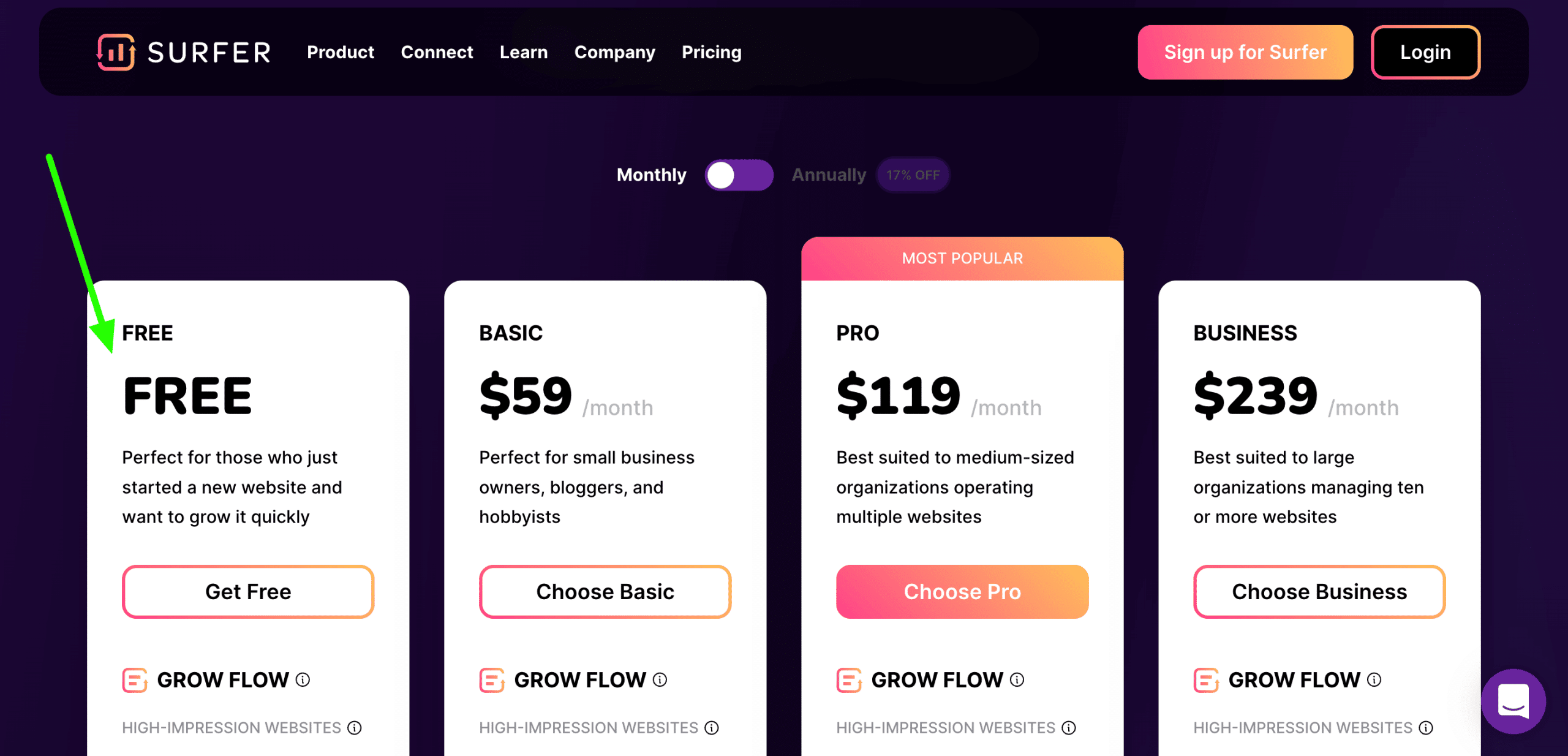
    And that’s exactly what sales funnels help you with. So, a suitable sales funnel will help your business reach the audience and convert them into customers.

    Consequently, a sales funnel also helps remove unqualified prospects, thereby shifting the business’ focus from them to those who matter.

    2. Generates Conversions

    The main aim of implementing sales funnels is to generate sales, and that’s what it enables by increasing awareness among the target audience. Moreover, a sales funnel carries the lead through the various steps, resulting in a sale.

    3. Spurs Referrals

    Using sales funnels also helps promote the business among prospects who may not initially be part of your target audience. This is possible as satisfied customers are triggered to refer your company to others, creating more awareness and leading to more sales.

    4. Audits Sales Process

    A well-planned sales funnel allows you to view the various steps in the sales process and make adjustments wherever required. As a result, you’ll be able to allocate your sales resources and time more efficiently.

    Final Verdict Of ClickFunnels Vs. Thrive Themes: Which One Should You Choose?

    There’s no denying that both marketing tools are highly efficient and offer much value for money.

    Both of these tools work great when starting affiliate marketing on a budget.

    And though we chose ClickFunnels as the better option in most of the aforementioned factors of comparison, it all comes down to your marketing requirements.

    So, if you want something that offers fuss-free E-commerce tools and pre-built sales funnels, ClickFunnels is your best bet.

    However, if you want more affordable software that allows visual optimization of your WordPress website, Thrive Themes is the way to go.

    Either way, they will both make you money online if that’s the answer you were truly looking for.

    If you’re still confused, you can always try both, as one comes with a trial period while the other offers a full refund after a month of use. So, at the end of the day, it’s a win-win for you!

    I hope you enjoyed this Clickfunnels vs Thrive Themes review.

    [lasso id=”1″ link_id=”56847″ type=”table”]

>